
Leave a Comment:
19 comments


setup exe has stopped working
Problem signature:
Problem Event Name: APPCRASH
Application Name: setup.exe_unknown
Application Version: 0.0.0.0
Application Timestamp: 459bb902
Fault Module Name: StackHash_cb5a
Fault Module Version: 0.0.0.0
Fault Module Timestamp: 00000000
Exception Code: c0000005
Exception Offset: 00002022
OS Version: 6.1.7600.2.0.0.256.1
Locale ID: 1033
Additional Information 1: cb5a
Additional Information 2: cb5adf8f5bac4bc39db6c83fb76b8021
Additional Information 3: b629
Additional Information 4: b6294e8956d765fe790565edb94347ea


Hi,
Has anyone successfully installed OBIEE on windows 7?
I tried the the recommendation and the install still failed. The setup.exe runs, but the message is received:
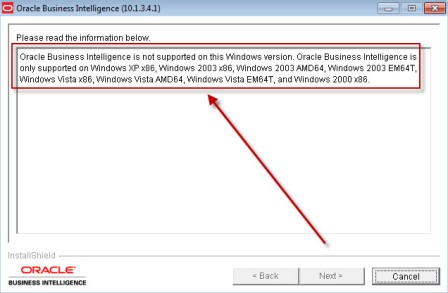
Oracle Business Intelligence is not supported on this Windows version.
TIA
Reply
Hi, Please try the below link , it should work ,
http://obieeblog.wordpress.com/2009/01/12/obiee-on-windows-7-beta-32-bits/
Mayank
Reply
I just successfully installed OBIEE 10.1.3.4.1 on Windows 7 Home Premium edition 64-bit. Things to watch out for are:
1. Download JDK 1.6 u 16 320bit version
2. Define environment variable JAVA_HOME
3. Add 32-bit Java Home in PATH definition
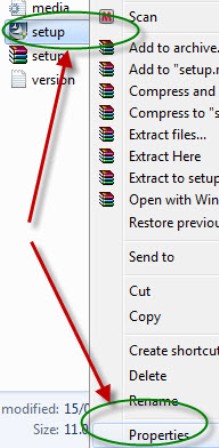
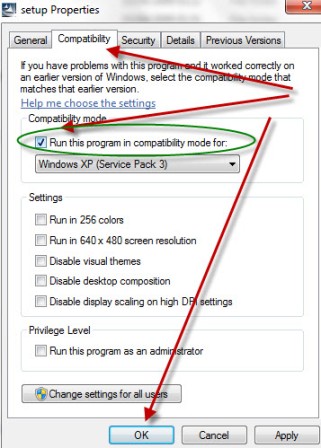
4. change the OBIEE setup.exe compatible mode to Vista for all users ( Win XP 3 did not work for me)

Here are the step by step instruction to install on OBIEE11g on XP.
OBIEE 11g installation on Windows XP
Thanks
-Raj


@ pniranjan,
Yes We provide online training , our training team will contact you . Check http://focusthread.com/training/obiee-training/99-obiee-training
New batch starting on 20th November
Reply
Hi,
I tried installing OBIEE 10g on Windows 7 as you have suggested but am facing the following error
“The Installer is unable to run in graphical mode. Try running the installer with the -console or -silent flag.
Please suggest.
Reply @Kiran29,
This error usually happens because of memory . See if you have enought free memory on system.
You could still install it in console (command line) mode.
Reply
It is not taking my Java/Bin folder,while installing in Win7-Home Premium(vista compatibility mode). What should I do?
Reply @ debabrata ,
Is this 64 bit windows 7 ? (It will not work on 64 bit hardware)

Hi Kiran
Yes. I got the same error, is your error fixed. Generally i am installing in C:\ drive having 200 GB free…eventhough i am getting the error. Have you tried installing Commandline mode?? if you have successfully installed could you please help me
Reply
i tried the same and get the following error ”
Oracle Business Intelligence is not supported on this Windows version. Oracle Business Intelligence is only supported on Windows XP x86, Windows 2003 x86, Windows 2003 AMD64, Windows 2003 EM64T, Windows Vista x86, Windows Vista AMD64, Windows Vista EM64T, and Windows 2000 x86.”
the changes are not getting reflected.. please guide.
Reply
Hi All,
I have installed OBIEE 10.1.3.4 on windows7 successfully it is working well.
But Java host services not starting if i try to start it’ll get stopped.Because the java jdk s/w it will install at program Files due to this reason Java host service not starting.
the above error is prgram Files having space.so better to avoid installing jdk at program files.
You’ve to create in anotherpath like below
C:\Java\JDK1.6..

@Atul,
can you provide me any info for obiee 10.1.3.4.1/10g mobile capability features?
Reply
Hi Atul Kumar
I am having problem in installing obiee 11g. Installed till step 13 i got errors ” creating error failed’ need some urgent help.
thanks
uma