
Leave a Comment:
24 comments

Hi Atul,
Can you please provide your Provisioning response file values or screens?
So, that I can understand what values has to give in the provisioning plan especially for middleware
Thank you,
Mohan
Reply
@ Mohan,
Are you looking for any specific screen or issue ? Full installation steps will follow after covering installation issues.
I am looking for Oracle Identity and Policy Management Configuration screens.
Thnak you,
Mohan
Reply
Hello Atul,
I’m also very interested if you can share the configuration values you set in your response file, specifically for the OAM part:
-> does the ‘Access Server Identifier’ refers to the FMW Webgate Id or the OAM Managed Server?
-> did you set an Open Mode or a Simple Mode for the OAM security Mode in your response file?
Thanks in advance and congratulations for your successful installation!*
Julien
Reply @ Julien,
I’ll post my OIM/OAM configuration for Fusion Apps shortly.
-> does the ‘Access Server Identifier’ refers to the FMW Webgate Id or the OAM Managed Server?
Yes, this is name of OAM managed server, if you use any other name then installation will fail at OHS/WebGate configuration stage.
-> did you set an Open Mode or a Simple Mode for the OAM security Mode in your response file?
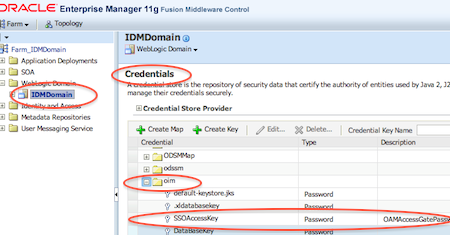
I used OPEN mode all over place for OAM. There is another bug where you need to add webgate password in OIM credential store framework.
Post errors you are hitting and I’ll try to help .
Reply Hello Atul,
thanks for your quick and clear answer.
I’m actually struggling with the Installation stage of the provisioning process with the Webgate installation.
Below is the extract of the error log. The error seems to be located from the webgate-build.xml file at line 313 (related to the copy of the logout.html file??)
Log file:
[2012-04-17T00:22:57.199+02:00] [runProvisioning-install] [WARNING] [] [runProvisioning-install] [tid: 12] [ecid: 0000JQwqhfE2jKWjLxESOA1FZ86s000003,0] [[
-W gccLibraryLocationBean.libraryLocation=”/u01/app/oracle/repository/faprov/provisioning/webgate/lib”
-P webgate.installLocation=”/u01/app/oracle/repository/faprov/provisioning/webgate”
-W userInfoBean.user=”oracle”
-W userInfoBean.group=”oinstall”
-W localePanel.defaultLang=”en”
-W securityModeBean.securityModeChoices=”simple”
-W askAutoUpdateWSBean.askAutoUpdateWSField=”No”
-W askLaunchBrowserBean.launchBrowser=”No”
]]
[2012-04-17T00:22:57.220+02:00] [runProvisioning-install] [NOTIFICATION] [FAPROV-01073] [runProvisioning-install] [tid: 12] [ecid: 0000JQwqhfE2jKWjLxESOA1FZ86s000003,0] [arg: /tmp/webgate-silent-install-1923896531.txt] Changing permissions recursively for /tmp/webgate-silent-install-1923896531.txt. This may take a while…
[2012-04-17T00:22:57.224+02:00] [runProvisioning-install] [NOTIFICATION] [FAPROV-01074] [runProvisioning-install] [tid: 12] [ecid: 0000JQwqhfE2jKWjLxESOA1FZ86s000003,0] Permissons changed.
[2012-04-17T00:22:57.254+02:00] [runProvisioning-install] [TRACE] [] [runProvisioning-install] [tid: 12] [ecid: 0000JQwqhfE2jKWjLxESOA1FZ86s000003,0] [SRC_CLASS: oracle.apps.fnd.provisioning.ant.taskdefs.util.logger.ProvisioningLogger] [SRC_METHOD: log] Installing webgate at /u01/app/oracle/repository/faprov/provisioning/webgate …
[2012-04-17T00:22:57.260+02:00] [runProvisioning-install] [TRACE] [] [runProvisioning-install] [tid: 12] [ecid: 0000JQwqhfE2jKWjLxESOA1FZ86s000003,0] [SRC_CLASS: oracle.apps.fnd.provisioning.ant.taskdefs.util.logger.ProvisioningLogger] [SRC_METHOD: log] curr installer is: provisioning.include.fs.techstack.webgate.installer
[2012-04-17T00:23:57.550+02:00] [runProvisioning-install] [WARNING] [] [runProvisioning-install] [tid: 12] [ecid: 0000JQwqhfE2jKWjLxESOA1FZ86s000003,0] [echo] There is an error. Please try again.[[
[echo] Generating a 1024 bit RSA private key
[echo] …………++++++
[echo] …………….++++++
[echo] writing new private key to
[echo] ‘/u01/app/oracle/repository/faprov/provisioning/webgate/access/oblix/config/simple/aaa_key.pem’
[echo] —–
[echo] writing RSA key
[echo] Using configuration from
[echo] /u01/app/oracle/repository/faprov/provisioning/webgate/access/oblix/tools/openssl/openssl_silent.cnf
[echo] Check that the request matches the signature
[echo] Signature ok
[echo] The Subject’s Distinguished Name is as follows
[echo] countryName :PRINTABLE:’US’
[echo] stateOrProvinceName :PRINTABLE:’Some-State’
[echo] localityName :PRINTABLE:’Locality Name’
[echo] organizationName :PRINTABLE:’Some-Organization Pty Ltd’
[echo] organizationalUnitName:PRINTABLE:’production’
[echo] commonName :PRINTABLE:’hostName.domainName.com’
[echo] emailAddress :IA5STRING:’mail@domain.com’
[echo] Certificate is to be certified until Apr 16 22:23:52 2013 GMT (365 days)
[echo]
[echo] Write out database with 1 new entries
[echo] Data Base Updated
]]
[2012-04-17T00:23:57.612+02:00] [runProvisioning-install] [NOTIFICATION] [] [runProvisioning-install] [tid: 12] [ecid: 0000JQwqhfE2jKWjLxESOA1FZ86s000003,0] [logStatus] STATE=BUILD_ERROR!TIMESTAMP=2012-04-17 00:23:57 CEST!TARGET=private-install-webgate!CATEGORY=serverstatus!DOMAIN=CommonDomain!HOSTNAME=crmhost1.efrontech.priv!PRODUCTFAMILY=webgate!PRODUCT=WebGate!TASK=install-webgate!TASKID=webgate.WebGate.NONE.private-install-webgate.NONE!MESSAGE=There is an error. Please try again. Generating a 1024 bit RSA private key …………++++++ …………….++++++ writing new private key to ‘/u01/app/oracle/repository/faprov/provisioning/webgate/access/oblix/config/simple/aaa_key.pem’ —– writing RSA key Using configuration from /u01/app/oracle/repository/faprov/provisioning/webgate/access/oblix/tools/openssl/openssl_silent.cnf Check that the request matches the signature Signature ok The Subject’s Distinguished Name is as follows countryName :PRINTABLE:’US’ stateOrProvinceName :PRINTABLE:’Some-State’ localityName :PRINTABLE:’Locality Name’ organizationName :PRINTABLE:’Some-Organization Pty Ltd’ organizationalUnitName:PRINTABLE:’production’ commonName :PRINTABLE:’hostName.domainName.com’ emailAddress :IA5STRING:’mail@domain.com’ Certificate is to be certified until Apr 16 22:23:52 2013 GMT (365 days) Write out database with 1 new entries Data Base Updated!DETAIL=!BUILDFILE=/u01/app/oracle/repository/faprov/provisioning/provisioning-build/common-misc-build.xml!LINENUMBER=107!
[2012-04-17T00:23:57.794+02:00] [runProvisioning-install] [ERROR] [] [runProvisioning-install] [tid: 12] [ecid: 0000JQwqhfE2jKWjLxESOA1FZ86s000003,0] FAPROV-00131
[2012-04-17T00:23:57.912+02:00] [runProvisioning-install] [NOTIFICATION] [FAPROV-01073] [runProvisioning-install] [tid: 12] [ecid: 0000JQwqhfE2jKWjLxESOA1FZ86s000003,0] [arg: /u01/app/oracle/repository/faprov/provisioning/instance/phaseguards/pf/install-crmhost1.efrontech.priv-fs-FAILED.grd] Changing permissions recursively for /u01/app/oracle/repository/faprov/provisioning/instance/phaseguards/pf/install-crmhost1.efrontech.priv-fs-FAILED.grd. This may take a while…
[2012-04-17T00:23:57.931+02:00] [runProvisioning-install] [NOTIFICATION] [FAPROV-01074] [runProvisioning-install] [tid: 12] [ecid: 0000JQwqhfE2jKWjLxESOA1FZ86s000003,0] Permissons changed.
[2012-04-17T00:23:57.933+02:00] [runProvisioning-install] [NOTIFICATION] [FAPROV-01197] [runProvisioning-install] [tid: 12] [ecid: 0000JQwqhfE2jKWjLxESOA1FZ86s000003,0] [arg: /u01/app/oracle/repository/faprov/provisioning/instance/phaseguards/pf/install-crmhost1.efrontech.priv-fs-FAILED.grd] Wrote phase guard file /u01/app/oracle/repository/faprov/provisioning/instance/phaseguards/pf/install-crmhost1.efrontech.priv-fs-FAILED.grd
[2012-04-17T00:23:58.088+02:00] [runProvisioning-install] [NOTIFICATION] [] [runProvisioning-install] [tid: 12] [ecid: 0000JQwqhfE2jKWjLxESOA1FZ86s000003,0] [logStatus] STATE=BUILD_ERROR!TIMESTAMP=2012-04-17 00:23:57 CEST!TARGET=private-invoke-fs!CATEGORY=none!DOMAIN=NONE!HOSTNAME=crmhost1.efrontech.priv!PRODUCTFAMILY=orchestration!PRODUCT=orchestration!TASK=none!TASKID=orchestration.orchestration.NONE.private-invoke-fs.NONE!MESSAGE=An Error Occured: !DETAIL=The following error occurred while executing this line:|/u01/app/oracle/repository/faprov/provisioning/provisioning-build/base-product-family-build.xml:85: The following error occurred while executing this line:|/u01/app/oracle/repository/faprov/provisioning/provisioning-build/fs-build.xml:302: The following error occurred while executing this line:|/u01/app/oracle/repository/faprov/provisioning/provisioning-build/fs-build.xml:1332: The following error occurred while executing this line:|/u01/app/oracle/repository/faprov/provisioning/provisioning-build/base-techstack-build.xml:62: The following error occurred while executing this line:|/u01/app/oracle/repository/faprov/provisioning/provisioning-build/webgate-build.xml:313: The following error occurred while executing this line:|/u01/app/oracle/repository/faprov/provisioning/provisioning-build/webgate-build.xml:849: The following error occurred while executing this line:|/u01/app/oracle/repository/faprov/provisioning/provisioning-build/common-misc-build.xml:109: There is an error. Please try again.|Generating a 1024 bit RSA private key|…………++++++|…………….++++++|writing new private key to|’/u01/app/oracle/repository/faprov/provisioning/webgate/access/oblix/config/simple/aaa_key.pem’|—–|writing RSA key|Using configuration from|/u01/app/oracle/repository/faprov/provisioning/webgate/access/oblix/tools/openssl/openssl_silent.cnf|Check that the request matches the signature|Signature ok|The Subject’s Distinguished Name is as follows|countryName :PRINTABLE:’US’|stateOrProvinceName :PRINTABLE:’Some-State’|localityName :PRINTABLE:’Locality Name’|organizationName :PRINTABLE:’Some-Organization Pty Ltd’|organizationalUnitName:PRINTABLE:’production’|commonName :PRINTABLE:’hostName.domainName.com’|emailAddress :IA5STRING:’mail@domain.com’|Certificate is to be certified until Apr 16 22:23:52 2013 GMT (365 days)||Write out database with 1 new entries|Data Base Updated!BUILDFILE=/u01/app/oracle/repository/faprov/provisioning/provisioning-build/common-misc-build.xml!LINENUMBER=107!
[2012-04-17T00:23:58.108+02:00] [runProvisioning-install] [ERROR] [] [runProvisioning-install] [tid: 12] [ecid: 0000JQwqhfE2jKWjLxESOA1FZ86s000003,0] FAPROV-00298 The following error occurred while executing this line:[[
/u01/app/oracle/repository/faprov/provisioning/provisioning-build/base-product-family-build.xml:85: The following error occurred while executing this line:
/u01/app/oracle/repository/faprov/provisioning/provisioning-build/fs-build.xml:302: The following error occurred while executing this line:
/u01/app/oracle/repository/faprov/provisioning/provisioning-build/fs-build.xml:1332: The following error occurred while executing this line:
/u01/app/oracle/repository/faprov/provisioning/provisioning-build/base-techstack-build.xml:62: The following error occurred while executing this line:
/u01/app/oracle/repository/faprov/provisioning/provisioning-build/webgate-build.xml:313: The following error occurred while executing this line:
/u01/app/oracle/repository/faprov/provisioning/provisioning-build/webgate-build.xml:849: The following error occurred while executing this line:
/u01/app/oracle/repository/faprov/provisioning/provisioning-build/common-misc-build.xml:109: There is an error. Please try again.
Generating a 1024 bit RSA private key
…………++++++
…………….++++++
writing new private key to
‘/u01/app/oracle/repository/faprov/provisioning/webgate/access/oblix/config/simple/aaa_key.pem’
—–
writing RSA key
Using configuration from
/u01/app/oracle/repository/faprov/provisioning/webgate/access/oblix/tools/openssl/openssl_silent.cnf
Check that the request matches the signature
Signature ok
The Subject’s Distinguished Name is as follows
countryName :PRINTABLE:’US’
stateOrProvinceName :PRINTABLE:’Some-State’
localityName :PRINTABLE:’Locality Name’
organizationName :PRINTABLE:’Some-Organization Pty Ltd’
organizationalUnitName:PRINTABLE:’production’
commonName :PRINTABLE:’hostName.domainName.com’
emailAddress :IA5STRING:’mail@domain.com’
Certificate is to be certified until Apr 16 22:23:52 2013 GMT (365 days)
Write out database with 1 new entries
Data Base Updated
Do you have any idea about the origin of this issue?
Thanks in advance,
Julien
Reply @ Julien,
Please update following
a) OAM mode – is this default OPEN or did you change it to SIMPLE or CERT ?
b) OAm Mode used during OIM-OAM integration ?
c) Did you hit any error during pre-verify phase that you skipped ?
Hello Atul,
at the moment, I’m still using SIMPLE mode in my provisioning process as I also used this mode for the OIM-OAM integration (I read somewhere that those 2 had to be consistent and had to be SIMPLE!!).
During the preverify phase, I skipped the error
”failed to connect to ldap ldap://idstore.efrontech.priv. verify and ensure connection details”.
As I am able to access ldap://idstore.efrontech.priv:3060 (via and LDAP client and via ODSM), I assumed it was safe to ignore this error (even though I can’t understand why it is occuring).
Regards,
Julien
Reply SIMPLE is fine as long as you used SIMPLE everywhere (I used OPEN which works as well), I hope you verified that credentials in OIF for OAM .
____
********* Seeding OAM Passwds in OIM *********
Enter ssoKeystore.jks Password:
Enter SSO Global Passphrase:
Completed loading user inputs for – CSF Config
Updating CSF with Access Gate Password…
WLS ManagedService is not up running. Fall back to use system properties for configuration.
Updating CSF ssoKeystore.jks Password…
Updating CSF for SSO Global Passphrase Password…
********* ********* *********
______
Regarding — During the preverify phase, I skipped the error ”failed to connect to ldap ldap://idstore.efrontech.priv. verify and ensure connection details”.
This could be an issue, reconfigure and see why you are hitting this error. Are you using SSL to connect to identity store ? (If yes then try non-ssl)
Reply
Hi Atul, came across weird error. I created 2 users in OIM console. Added userA to System Administrators group. When I try to login into OIM console, it says invalid user userA. I know the exact pwd and it is nothing but Welcome1 and OIM server is throwing below exception:
I checked this user in OID and it is there. Even for userB, I am unable to login. No idea what is going on. Did not find solution in the forums also. Appreciate if you can help me out.
I am just wondering is it because SSO ? I am able to login only with xelsysadmin into OIM console now.
thanks
Jyothi.
Sorry..I did not add the exception in my previous message :
sorry if I have posted my question in an incorrect forum. I did some research to find out the right forum and could not see the right one.
thanks
Jyothi
I do not know why I am unable to post the exception here in the forum…it is not displaying. I can see it while writing but when I post I do not see it.
The server console shows me ” User Anonymous not found, Invalid Input username/password”
thanks
Jyothi.
Hello Atul,
I’m stuck in the Preverify stage of installing the 11.1.4 version of FA;
I’ve got an error quite similar to the one you are stating in your article (Cannot perform OAM Validation as null). I’ve been able to check that WebGate Password is seeded correctly in to CSF.
Here is the full description of the error I got:
[2012-07-24T17:48:57.221+02:00] [runProvisioning-preverify] [NOTIFICATION] [] [runProvisioning-preverify] [tid: 13] [ecid: 0000JYtexaO2jKWjLxESOA1G3gDK000004,0] [logStatus] STATE=BUILD_ERROR!TIMESTAMP=2012-07-24 17:48:57 CEST!TARGET=common-preverify-security!CATEGORY=BUILD_ERROR!DOMAIN=CommonDomain!HOSTNAME=crmhost1.efrontech.priv!PRODUCTFAMILY=fs!PRODUCT=Functional-Setup!TASK=validateOim!TASKID=fs.Functional-Setup.BUILD_ERROR.common-preverify-security.validateOim!MESSAGE=List of failed Validation in OIM 1. OAM_Validation : Cannot perform OAM Validation as null 2. dc=efrontech,dc=priv : Cannot validate : dc=efrontech,dc=priv in OVD 3. cn=changelog : Cannot validate : cn=changelog in OVD !DETAIL=List of failed Validation in OIM||1. OAM_Validation : Cannot perform OAM Validation as null||2. dc=efrontech,dc=priv : Cannot validate : dc=efrontech,dc=priv in OVD||3. cn=changelog : Cannot validate : cn=changelog in OVD||!BUILDFILE=/u01/app/oracle/repository/faprov/provisioning/provisioning-build/common-preverify-build.xml!LINENUMBER=333!
[2012-07-24T17:48:57.253+02:00] [runProvisioning-preverify] [ERROR] [FAPROV-01045] [runProvisioning-preverify] [tid: 13] [ecid: 0000JYtexaO2jKWjLxESOA1G3gDK000004,0] *** Validation Error! ***[[
]]
[2012-07-24T17:48:57.253+02:00] [runProvisioning-preverify] [ERROR] [] [runProvisioning-preverify] [tid: 13] [ecid: 0000JYtexaO2jKWjLxESOA1G3gDK000004,0] List of failed Validation in OIM[[
1. OAM_Validation : Cannot perform OAM Validation as null
2. dc=efrontech,dc=priv : Cannot validate : dc=efrontech,dc=priv in OVD
3. cn=changelog : Cannot validate : cn=changelog in OVD
Do you have any clue about this error? It would be a great help for me because I’m out of ideas.
Thanks in advance,
Julien
Reply
Hello Atul,
after couple of days later when I check my OIM server was down and when I try to restart it is not restarting only one error Eventhandlers.xml which can be ignored.
But when I check Diagnostic then I see follwoing:
[2012-11-16T06:17:37.986-08:00] [wls_oim1] [WARNING] [IAM-0080071] [oracle.iam.platform.kernel.impl] [tid: [ACTIVE].ExecuteThread: ‘0’ for queue: ‘weblogic.kernel.Default (self-tuning)’] [userId: oiminternal] [ecid: 1e1fdf0e0c30c785:-304f413d:13b0993aaea:-8000-0000000000000003,0] [APP: oim#11.1.1.3.0] Preview stage is not supported in kernel and found an event handler with name Preview implemented by the class oracle.iam.notification.impl.CustomEntityPreviewer for this stage. It will be ignored.
[2012-11-16T06:17:37.988-08:00] [wls_oim1] [WARNING] [IAM-0080071] [oracle.iam.platform.kernel.impl] [tid: [ACTIVE].ExecuteThread: ‘0’ for queue: ‘weblogic.kernel.Default (self-tuning)’] [userId: oiminternal] [ecid: 1e1fdf0e0c30c785:-304f413d:13b0993aaea:-8000-0000000000000003,0] [APP: oim#11.1.1.3.0] Preview stage is not supported in kernel and found an event handler with name Preview implemented by the class oracle.iam.notification.impl.CustomEntityPreviewer for this stage. It will be ignored.
[2012-11-16T06:17:37.993-08:00] [wls_oim1] [NOTIFICATION] [IAM-0080041] [oracle.iam.platform.kernel.impl] [tid: [ACTIVE].ExecuteThread: ‘0’ for queue: ‘weblogic.kernel.Default (self-tuning)’] [userId: oiminternal] [ecid: 1e1fdf0e0c30c785:-304f413d:13b0993aaea:-8000-0000000000000003,0] [APP: oim#11.1.1.3.0] Event handler with Name = Pre1Create already exists. Overriding.$Proxy287 with $Proxy287
[2012-11-16T06:17:38.022-08:00] [wls_oim1] [NOTIFICATION] [IAM-0080041] [oracle.iam.platform.kernel.impl] [tid: [ACTIVE].ExecuteThread: ‘0’ for queue: ‘weblogic.kernel.Default (self-tuning)’] [userId: oiminternal] [ecid: 1e1fdf0e0c30c785:-304f413d:13b0993aaea:-8000-0000000000000003,0] [APP: oim#11.1.1.3.0] Event handler with Name = InitiateSodCheck already exists. Overriding.oracle.iam.sod.eventhandlers.InitiateSodCheck with oracle.iam.sod.eventhandlers.InitiateSodCheck
[2012-11-16T06:17:38.023-08:00] [wls_oim1] [NOTIFICATION] [IAM-0080041] [oracle.iam.platform.kernel.impl] [tid: [ACTIVE].ExecuteThread: ‘0’ for queue: ‘weblogic.kernel.Default (self-tuning)’] [userId: oiminternal] [ecid: 1e1fdf0e0c30c785:-304f413d:13b0993aaea:-8000-0000000000000003,0] [APP: oim#11.1.1.3.0] Event handler with Name = InitiateSodCheck already exists. Overriding.oracle.iam.sod.eventhandlers.InitiateSodCheck with oracle.iam.sod.eventhandlers.InitiateSodCheck
[2012-11-16T06:17:38.024-08:00] [wls_oim1] [NOTIFICATION] [IAM-0080041] [oracle.iam.platform.kernel.impl] [tid: [ACTIVE].ExecuteThread: ‘0’ for queue: ‘weblogic.kernel.Default (self-tuning)’] [userId: oiminternal] [ecid: 1e1fdf0e0c30c785:-304f413d:13b0993aaea:-8000-0000000000000003,0] [APP: oim#11.1.1.3.0] Event handler with Name = InitiateSodCheck already exists. Overriding.oracle.iam.sod.eventhandlers.InitiateSodCheck with oracle.iam.sod.eventhandlers.InitiateSodCheck
[2012-11-16T06:17:38.025-08:00] [wls_oim1] [NOTIFICATION] [IAM-0080041] [oracle.iam.platform.kernel.impl] [tid: [ACTIVE].ExecuteThread: ‘0’ for queue: ‘weblogic.kernel.Default (self-tuning)’] [userId: oiminternal] [ecid: 1e1fdf0e0c30c785:-304f413d:13b0993aaea:-8000-0000000000000003,0] [APP: oim#11.1.1.3.0] Event handler with Name = InitiateSodCheck already exists. Overriding.oracle.iam.sod.eventhandlers.InitiateSodCheck with oracle.iam.sod.eventhandlers.InitiateSodCheck
[2012-11-16T06:17:38.026-08:00] [wls_oim1] [NOTIFICATION] [IAM-0080041] [oracle.iam.platform.kernel.impl] [tid: [ACTIVE].ExecuteThread: ‘0’ for queue: ‘weblogic.kernel.Default (self-tuning)’] [userId: oiminternal] [ecid: 1e1fdf0e0c30c785:-304f413d:13b0993aaea:-8000-0000000000000003,0] [APP: oim#11.1.1.3.0] Event handler with Name = InitiateSodCheck already exists. Overriding.oracle.iam.sod.eventhandlers.InitiateSodCheck with oracle.iam.sod.eventhandlers.InitiateSodCheck
[2012-11-16T06:17:38.027-08:00] [wls_oim1] [NOTIFICATION] [IAM-0080041] [oracle.iam.platform.kernel.impl] [tid: [ACTIVE].ExecuteThread: ‘0’ for queue: ‘weblogic.kernel.Default (self-tuning)’] [userId: oiminternal] [ecid: 1e1fdf0e0c30c785:-304f413d:13b0993aaea:-8000-0000000000000003,0] [APP: oim#11.1.1.3.0] Event handler with Name = InitiateSodCheck already exists. Overriding.oracle.iam.sod.eventhandlers.InitiateSodCheck with oracle.iam.sod.eventhandlers.InitiateSodCheck
[2012-11-16T06:17:38.036-08:00] [wls_oim1] [NOTIFICATION] [IAM-0080041] [oracle.iam.platform.kernel.impl] [tid: [ACTIVE].ExecuteThread: ‘0’ for queue: ‘weblogic.kernel.Default (self-tuning)’] [userId: oiminternal] [ecid: 1e1fdf0e0c30c785:-304f413d:13b0993aaea:-8000-0000000000000003,0] [APP: oim#11.1.1.3.0] Event handler with Name = UserLockedNotificationHandler already exists. Overriding.oracle.iam.sso.eventhandlers.UserLockedNotificationHandler with oracle.iam.sso.eventhandlers.UserLockedNotificationHandler
[2012-11-16T06:17:38.039-08:00] [wls_oim1] [NOTIFICATION] [IAM-0080041] [oracle.iam.platform.kernel.impl] [tid: [ACTIVE].ExecuteThread: ‘0’ for queue: ‘weblogic.kernel.Default (self-tuning)’] [userId: oiminternal] [ecid: 1e1fdf0e0c30c785:-304f413d:13b0993aaea:-8000-0000000000000003,0] [APP: oim#11.1.1.3.0] Event handler with Name = UserStatusNotificationHandler already exists. Overriding.oracle.iam.sso.eventhandlers.UserStatusNotificationHandler with oracle.iam.sso.eventhandlers.UserStatusNotificationHandler
[2012-11-16T06:17:38.041-08:00] [wls_oim1] [NOTIFICATION] [IAM-0080041] [oracle.iam.platform.kernel.impl] [tid: [ACTIVE].ExecuteThread: ‘0’ for queue: ‘weblogic.kernel.Default (self-tuning)’] [userId: oiminternal] [ecid: 1e1fdf0e0c30c785:-304f413d:13b0993aaea:-8000-0000000000000003,0] [APP: oim#11.1.1.3.0] Event handler with Name = UserUpdatedNotificationHandler already exists. Overriding.oracle.iam.sso.eventhandlers.UserUpdatedNotificationHandler with oracle.iam.sso.eventhandlers.UserUpdatedNotificationHandler
[2012-11-16T06:17:38.044-08:00] [wls_oim1] [NOTIFICATION] [IAM-0080041] [oracle.iam.platform.kernel.impl] [tid: [ACTIVE].ExecuteThread: ‘0’ for queue: ‘weblogic.kernel.Default (self-tuning)’] [userId: oiminternal] [ecid: 1e1fdf0e0c30c785:-304f413d:13b0993aaea:-8000-0000000000000003,0] [APP: oim#11.1.1.3.0] Event handler with Name = RoleGrantNotification already exists. Overriding.oracle.iam.sso.eventhandlers.RoleGrantNotificationHandler with oracle.iam.sso.eventhandlers.RoleGrantNotificationHandler
[2012-11-16T06:17:38.045-08:00] [wls_oim1] [NOTIFICATION] [IAM-0080041] [oracle.iam.platform.kernel.impl] [tid: [ACTIVE].ExecuteThread: ‘0’ for queue: ‘weblogic.kernel.Default (self-tuning)’] [userId: oiminternal] [ecid: 1e1fdf0e0c30c785:-304f413d:13b0993aaea:-8000-0000000000000003,0] [APP: oim#11.1.1.3.0] Event handler with Name = RoleGrantNotification already exists. Overriding.oracle.iam.sso.eventhandlers.RoleGrantNotificationHandler with oracle.iam.sso.eventhandlers.RoleGrantNotificationHandler
[2012-11-16T06:17:38.065-08:00] [wls_oim1] [NOTIFICATION] [IAM-0040016] [oracle.iam.platform.entitymgr.impl] [tid: [ACTIVE].ExecuteThread: ‘0’ for queue: ‘weblogic.kernel.Default (self-tuning)’] [userId: oiminternal] [ecid: 1e1fdf0e0c30c785:-304f413d:13b0993aaea:-8000-0000000000000003,0] [APP: oim#11.1.1.3.0] Initializing data provider for entity type – Role of type OIMRoleDataProvider
[2012-11-16T06:17:38.345-08:00] [wls_oim1] [NOTIFICATION] [IAM-1010010] [oracle.iam.platform.authz.impl] [tid: [ACTIVE].ExecuteThread: ‘0’ for queue: ‘weblogic.kernel.Default (self-tuning)’] [userId: oiminternal] [ecid: 1e1fdf0e0c30c785:-304f413d:13b0993aaea:-8000-0000000000000003,0] [APP: oim#11.1.1.3.0] ********** Entering the Authorization Segment with parameters:: LoggedInUserId = 4, target resourceID = null, Feature = SCHEDULER, Action = SCHEDULER_START **********
[2012-11-16T06:17:38.350-08:00] [wls_oim1] [NOTIFICATION] [] [oracle.iam.platform.authz.impl] [tid: [ACTIVE].ExecuteThread: ‘0’ for queue: ‘weblogic.kernel.Default (self-tuning)’] [userId: oiminternal] [ecid: 1e1fdf0e0c30c785:-304f413d:13b0993aaea:-8000-0000000000000003,0] [APP: oim#11.1.1.3.0] oesAuthenticIdentity not found in cache
[2012-11-16T06:17:38.353-08:00] [wls_oim1] [NOTIFICATION] [IAM-3050013] [oracle.iam.identity.usermgmt.impl] [tid: [ACTIVE].ExecuteThread: ‘0’ for queue: ‘weblogic.kernel.Default (self-tuning)’] [userId: oiminternal] [ecid: 1e1fdf0e0c30c785:-304f413d:13b0993aaea:-8000-0000000000000003,0] [APP: oim#11.1.1.3.0] Searching for users with the specified criteria.
[2012-11-16T06:17:38.355-08:00] [wls_oim1] [NOTIFICATION] [IAM-1010104] [oracle.iam.platform.authz.impl] [tid: [ACTIVE].ExecuteThread: ‘0’ for queue: ‘weblogic.kernel.Default (self-tuning)’] [userId: oiminternal] [ecid: 1e1fdf0e0c30c785:-304f413d:13b0993aaea:-8000-0000000000000003,0] [APP: oim#11.1.1.3.0] The roles [1, 22, 6, 11, 13, 14, 20, 21, 5, 8, 17, 23, 3, 7, 18, 10, 9, 12, 15, 16] and logged-in userid oiminternal were passed for constructing authentic-identity for the hasAccess calls.
[2012-11-16T06:17:38.362-08:00] [wls_oim1] [NOTIFICATION] [IAM-1010033] [oracle.iam.platform.authz.impl] [tid: [ACTIVE].ExecuteThread: ‘0’ for queue: ‘weblogic.kernel.Default (self-tuning)’] [userId: oiminternal] [ecid: 1e1fdf0e0c30c785:-304f413d:13b0993aaea:-8000-0000000000000003,0] [APP: oim#11.1.1.3.0] OES Results are not found in cache with Key F: SCHEDULERS: 4P: SCHEDULER_STARTOESDefinition
[2012-11-16T06:17:38.639-08:00] [wls_oim1] [NOTIFICATION] [IAM-1010021] [oracle.iam.platform.authz.impl] [tid: [ACTIVE].ExecuteThread: ‘0’ for queue: ‘weblogic.kernel.Default (self-tuning)’] [userId: oiminternal] [ecid: 1e1fdf0e0c30c785:-304f413d:13b0993aaea:-8000-0000000000000003,0] [APP: oim#11.1.1.3.0] Validating the Internal Obligations: [InternalObligation: name: noop, values: [true], convertToObligation: false, InternalObligation: name: noop, values: [true], convertToObligation: false]
[2012-11-16T06:17:38.642-08:00] [wls_oim1] [NOTIFICATION] [IAM-1010022] [oracle.iam.platform.authz.impl] [tid: [ACTIVE].ExecuteThread: ‘0’ for queue: ‘weblogic.kernel.Default (self-tuning)’] [userId: oiminternal] [ecid: 1e1fdf0e0c30c785:-304f413d:13b0993aaea:-8000-0000000000000003,0] [APP: oim#11.1.1.3.0] ———- The list of Internal Obligation is satisfied, returning TRUE ———-
[2012-11-16T06:17:38.643-08:00] [wls_oim1] [NOTIFICATION] [IAM-1010026] [oracle.iam.platform.authz.impl] [tid: [ACTIVE].ExecuteThread: ‘0’ for queue: ‘weblogic.kernel.Default (self-tuning)’] [userId: oiminternal] [ecid: 1e1fdf0e0c30c785:-304f413d:13b0993aaea:-8000-0000000000000003,0] [APP: oim#11.1.1.3.0] ********** Exiting the Authorization Segment with result Decision :PERMIT[[
Obligations from policy: **********
]]
[2012-11-16T06:17:39.218-08:00] [wls_oim1] [NOTIFICATION] [IAM-0080013] [oracle.iam.platform.kernel.impl] [tid: [ACTIVE].ExecuteThread: ‘0’ for queue: ‘weblogic.kernel.Default (self-tuning)’] [userId: oiminternal] [ecid: 1e1fdf0e0c30c785:-304f413d:13b0993aaea:-8000-0000000000000003,0] [APP: oim#11.1.1.3.0] Kernel executing default validation with process id, event id, entity and operation 38,843.0.JobDetails.START_SCHEDULER
[2012-11-16T06:17:39.349-08:00] [wls_oim1] [NOTIFICATION] [IAM-1020024] [oracle.iam.scheduler.impl.quartz] [tid: [ACTIVE].ExecuteThread: ‘0’ for queue: ‘weblogic.kernel.Default (self-tuning)’] [userId: oiminternal] [ecid: 1e1fdf0e0c30c785:-304f413d:13b0993aaea:-8000-0000000000000003,0] [APP: oim#11.1.1.3.0] Execute default action handler with 38843.41423.JobDetails.START_SCHEDULER.entityId=null
Can you please help to fix this, it is already down from last 3 weeks, no luck to fix this yet.
Thanks
R.K
@ R K ,
I don’t see any error in this (event handler is safe to ignore).
Do you see any error in out file ?
Is there any other product installed on this machine ?
If yes then stop OIM , change permission of /tmp to 777 (recursive) and then start OIM . See if you still hit error (paste error message from OIM out file)
Reply Thanks Atul for quick response!
I have full FA 11.1.3 is installed on this machine. and I am not starting this from em, I am starting from terminal. I didn’t see any error in log, it look like it is waiting for the scheduler to run which is not running (in diagnostic log)and stuck in starting mode which never finished.
So I am stuck here no idea what to do, please help me.
Thanks
R.K
What command you are running ?
Paste outout of command here
What versio of OIM did you install ?
Did it ever work ?
Reply Hello Atul,
I am running ‘nohup ./startManagedWblogic.sh wls_oim1 &’.
OIM 11.1.1.5
Yes it worked for long time and I just create a user and assign some FA roles, and it was working fine, then later some other when I check EM I saw it was down and since that day it is not coming to live.
Thanks
RK
Hello Atul,
I tried couple of times but it is not getting pasted. so I just sent you nohup file at contact@OnlineAppsDBA.com,
Thanks
RK
Hello Atul,
Did you get chance to look nohup?
Please let me know if you find something.
Thanks
Rajeev
Hello Atul,
did you find anything in nohup file which I sent you.
If you please suggest me anything which you finds that will be great.
Thanks
RK

In OIM – OAM integration,
when i am executing following command
./idmConfigTool.sh -configOIM input_file=/u01/IntgFiles/OIMconfigPropertyFile
i am getting following error
Enter sso access gate password :
Enter sso keystore jks password :
Enter sso global passphrase :
Enter mds db schema password :
Enter idstore admin password :
Enter admin server user password :
Enter oam11g domain admin user password :
********* Seeding OAM Passwds in OIM *********
Completed loading user inputs for – CSF Config
Completed loading user inputs for – Dogwood Admin WLS
Connecting to t3://ict.oimsoa.com:7001
Connection to domain runtime mbean server established
Seeding credential :SSOAccessKey
Seeding credential :SSOGlobalPP
Seeding credential :SSOKeystoreKey
********* ********* *********
********* Activating OAM Notifications *********
Completed loading user inputs for – MDS DB Config
Exception occurred while performing ConfigOIM operations.
please help me,
Thanks in Advance.
Reply
Hi Abhishek,
Facing the same issue while integrating OAM-OIM>
Did you get a resolution for the same? If so , please help me.
Thanks
Reply