

Leave a Comment:
23 comments

Have you seen this output before? I get the same response with multiple servers and different environments (PROD, TEST, etc)
wls:/test_sso_domain/serverConfig> exportPolicy(pathTempOAMPolicyFile=’/u01/app/oracle/admin/test_sso_domain/mserver/test_sso_domain/policy-export.xml’)
Traceback (innermost last):
File “”, line 1, in ?
NameError: exportPolicy
wls:/test_sso_domain/serverConfig>


I am running it from the ORACLE_HOME/common/bin folder but im still getting an error:
wls:/idm_domain/serverRuntime> exportPolicy(pathTempOAMPolicyFile=’/odrive/oracle/temp/policies.xml’)
Traceback (innermost last):
File “”, line 1, in ?
NameError: exportPolicy
I have executed it just now from $ORACLE_HOME/common/bin.
Looks like you are executing some other than after connecting and before exportPolicy. In my case wls:/base_domain/serverConfig, in your case wls:/idm_domain/serverRuntime
wls:/base_domain/serverConfig> exportPolicy(pathTempOAMPolicyFile=’/app/shared/home/tmweb/Oracle/Middleware_Dev2/oam_policies_latest.xml’)
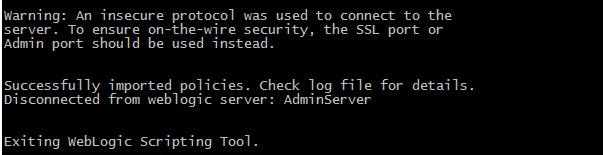
Successfully exported policies. Check log file for details.
wls:/base_domain/serverConfig>
I was trying something else in the above example. I did this and it still does not work:
bash-3.00$ /odrive/oracle/Middleware/wlserver_10.3/common/bin/wlst.sh
wls:/offline> connect(‘weblogic’,’password’,’host:port’)
Connecting to t3://www.localcorp.biz:7001 with userid weblogic …
Successfully connected to Admin Server ‘AdminServer’ that belongs to domain ‘idm_domain’.
Warning: An insecure protocol was used to connect to the
server. To ensure on-the-wire security, the SSL port or
Admin port should be used instead.
wls:/idm_domain/serverConfig> exportPolicy(pathTempOAMPolicyFile=’/odrive/oracle/temp/policies.xml’)
Traceback (innermost last):
File “”, line 1, in ?
NameError: exportPolicy

[…] have covered export and import of policies in previous post . The export and import partners also entail in similar steps using WLST […]
Reply […] OAM 11g Policies are stored in database and this needs to be exported to an XML file, read this post for more details. The policies in target environment should have URLs (such as Authentication […]
Reply
When we do a export of policy data, we get multiple files. For example, if we run:
exportPolicy(pathTempOAMPolicyFile=’/tmp/oam_policies.xml’);
we get 5 additional files with names of the form:
oam_policies.xml.@.1
through
oam_policies.xml.@.5
What are these additional files and are they needed for the import?
Thanks
Aspi Engineer
The formatting for my last post was lost.
The 5 files have the naming convention:
oam_policies.xml.NNN@MACHINE-NAME.1
through
oam_policies.xml.NNN@MACHINE-NAME.5

I created a Join Adapter (AD-OID) and now my ovd is the default userstore. Let Say myOrgPerson(similar to inetOrgPerson) is my custom objectclass in which myDepartmentName is the attribute.
My Question is how can I create a condition of type attribute in Autherization Policy to compare the attribute value with “IT”.
Thanks in advance.
Reply Is it OAM 10g or 11g? In 10g, you can add the object class to Identity system and specify the rule in authorization rule of policy domain.
Reply Hi Mahendra,
Thanks for quick reply.
I am using OAM 11gR2.
Or Else can I create a condition of type attribute in Autherization Policy to compare the attribute “employeeTpe” (which is not a custom attribute) with the attribute value with “Permanent”.
And one more question is, Is it possible to set AD password in response headers in Authorization policy, Previously I mention that I am using OVD as default user store which points to a Join adapter(AD-OID) here OID is primary adapter and AD is the bind adapter.
Thanks in Advance.
Reply I’m not sure how you do it in 11gR2. Why do you want to send password in response headers? Is not it a security risk?
Reply
Hi Mahendra,
what if I would like to change something to the file produced by the export and import the changed file ?
In particular, I have to move policy from one environment to another and for some policy I will have to change the authentication scheme.
thanks
kind regards
Giovanni

Hi Mahendra, I am trying to import partners using wlst tool in OAM 11.1.2.2.0. I am running it from ORACLE_HOME/common/bin and it goes well successfully. However, I do not see any change in oam-config.xml. There is no entry for any SSO Agents created. But, the artifacts are generated.
Reply I am also able to see the list og webgate instances under SSO agents in the console.
Reply
Hi, I ran importConfig and it hanged up. Any idea why that would happen and how to prevent data inconsistency?
Reply