
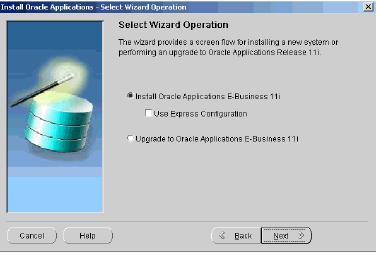
This Post will Contain broad level steps of Oarcle apps Installation , this is just for Overview or High level step for Installing Apps. For details & exact commands refer to Oracle Installation Guide mentioned at bottom of this post .
Pre Instalaltion Steps
Check System requirement:
Software Requirenet : like ar, ld, make, gcc, make, Xdisplay - (Unix), MS C++, MKS
Toolkit (Windows)
CPU : It depends on Size, no. of Users … ( For Test Installation don’t worry)
Memory : SGA, Concurrent Users ( Usually 2GB should be enough for testing)
Disk Space : 26 GB Application Tier and for database Tier (35GB Production DB,
65 GB for Vision DB )
Once prechecks are done create User ( Single User or Two user ), with Single user will install both application tier and database tier and for Two user user1(oramgr) will install & own Database tier & user2(appmgr) will install & own Application Tier. (If you don’t knwo what is application or database tier please go through my previous post).
Install MS XML Parser 3.0 Service pack 4 (Only if you are installing Apps in Windows)
Start Apps Installation
go to nstallation software ( either mounted on filessystem or Via CD ) & run rapidwiz ( For windows its rapidwiz.cmd)
Use rapidwiz -restart (If your Installation fails anytime in between , Good feature which Oracle incorporated quite late
lucky you are that this option is there )
Installer will ask you some questions regarding system answer them
For Installation Step by Step screens refer Guide mentioned at bottom of this post , chapter 2 page 30 to 57 ( Just 27 pages , Hope its not too much
)Post Installation ( Though these are not required for Testing How apps Installation work)
few things which you might want to do after Installation
Update PL/SQL Log and Out directory
Configure DB Init parameter
Login to Apps
Download jinitiator on client PC ( It will automatically prompt to install on client machine when accessing forms)For full Installation steps please refer guide at http://download-east.oracle.com/docs/cd/B25516_08/current/acrobat/r115102ins.pdf
So this sums up your Apps Installation , If you have any queries / doubts please leave comments or drop a mail at teachmeoracle@yahoo.com
Apps Installation Training
Related Posts for Install 11i
Popularity: 11% [?]


Good hands-on exercises (installation, patching, cloning), very experienced trainer worth every penny
21 users commented in " Install Oracle Apps "
Follow-up comment rss or Leave a TrackbackHi Atul,
Don’t we need to add application.env file to applmgr connexion scripts ?
Hi agostino,
Could you repeat why you want to do that .
After Install that assumed that environment file is called from user (applmgr ) shell so that all variable’s are set before doing any activity on server .
Atul
Dear Atul,
I am getting error X server is not set correctly while configuration of Notification mailer from OAM. Please look into this tar for detials. The tar no is
6165283.992.
Please let me know urgent.
Thanks
Mohammed.
Sr.Oracle DBA
Bangalore
India,
Hi Mohammed,
I don’t have access to any other clients metalink tars (except my CSI number) so I can’t access issue.
Though you can raise it in forum at http://teachMeOracle.com with log file any & WF Mailer version
Hi Atul,
Could you give some topic about multi node installtion, and
RAC installation and 11i installed in RAC environment.
Thanks and Regards,
Jo.
Regarding Apps DBA responsiblity:
Once we successfully installed Oracle 11i (11.5.10) from staging, what is the next step Apps DBA to do before handed over to Functional people?
Thanks and Regards,
Jo.
hi atul ,
what r the 3rd party softwares for installation of apps ….
Dev if you are installing apps on windows then you need third party software like VC++, MKS …
Hi Atul,
I am facing problem with sign on on linux platform and client machines so please can you suggest/help in this regards.
Problem: add plugins on linux web browser page and even not connect client machine.
Mohammed Isa.
Oracle Financial Administrator
Riyadh.
Riyadh,
If you are connecting to 11i from linux client browser this is not certified or supported .
Atul
hi atul
i just saw u r blog and it is very very good.acutually just now joined the course.please give me the some basic suggestions for starters.
Focus on basics, read between lines and lot of practice
Which client do we install when accessing 11i?
You use web browser (IE/Mozilla) as apps client in which use java plugin or jinitiator for forms
Hi Atul,
Can u plz tell me the steps for laoding the Oracle Apps on Windows
vista operating system? If there is any doc..please let me know..i want
to install the Oracle apps on my laptop which has got Windows vista Home
premium as OS.
Thanking you in advance
-Pratap
Pratap,
Vista is not supported o.s. to install apps. Try following this doc (same is windows 2004)
http://onlineappsdba.com/index.php/2008/07/02/install-oracle-apps-r1212i-on-windows/
Hi Atul,
Thanks for your reply.
I will try to load it through Virtual PC2007 or Virtual Machine.
One last question..
Do i need to specify drives while installing Server 2003? How many drives should be created and of what size, for each drive?
My Laptop has got a configuration as below
HDD-250 GB
RAM-3GB
Processor-Intel core 2 duo 2.1GHZ
Operating system-Windows vista Home premium.
Please let me know how many drives to be created and should be of what size?
Thanks and Regards
Pratap
hi
please tail me i want to install 11.5.10.2 on IBM AIX 5.3 what pre requsit needed for this
java oe perl is needed for its ya its alrady come with os like rhel
Hi Atul,
can you plesae help me in installing Oracle Apps in my laptop..I want to know how much disk space is reuired to load the R12 version in to my laptop?
Hi Atul
I have installed oracle apps Vission Instance on windows Xp. The installation was successful.
but when i try to log on to apps it does log in and asks for Jinitatior to install this happens every time i click on any module(system admin )
it keeps on installing the Jinitator but never opened a form.
Can you please help
@ RK,
Is this 11i or R12 ? It seems there is issue with jinitiator configuration on server or there is problem installing jinitiator on your local machine.
Check version of jinintiator on server and see if that version is installed on your client PC.
If not, search for specific jinitiator version (one on server) and then install it manually and then try
Leave A Reply