
Well lot of my readers were pushing me to write on printer configuration and I was dragging it since long but now as I have started getting lot of mails of printer step(either for certification or for interview) so finally I decided to start with Printers Basics & to understand printers in Apps Understanding these basics terminology is quite important.
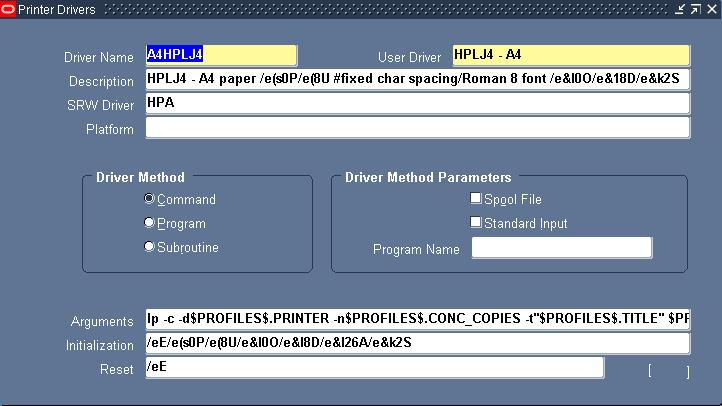
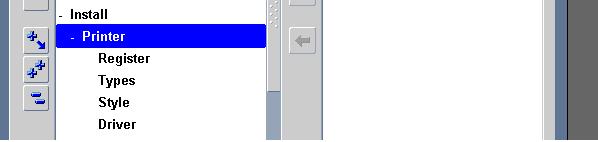
Printer Drivers : As you see in last section under Install -> Printer Section, driver delivers command to printer about how to output a specific print style. You can understand them as series of instructions used by print style for a particular printer.
Example of Drivers is A4HPLJ4
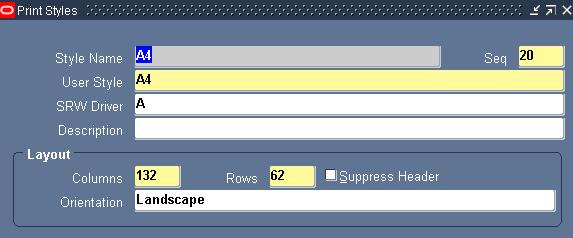
Printer Style : Tells printer how printed output should look, for ex. Number of lines in page, width of line , whether header to print or not. A printer can have more than one style as long as printer supports it. If a print style is available & registers for a particular printer then only it will be visible to user (In some CM reports these styles are predefined and can’t be changed)
Example of Print Style is A4
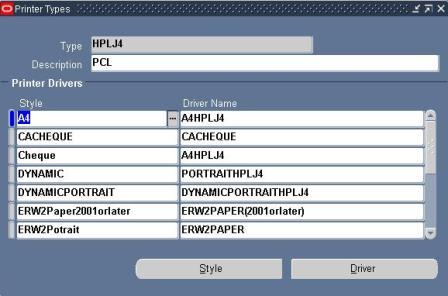
Printer type : is to identify printer by manufacturer & model number for ex. HP laser Jet III
Printer Type form in Apps ( Install -> Printer -> Types) associate Style with Driver Name .
For Ex. with Printer Type HPLJ4 , you see style A4 & driver A4HPLJ4
SRW - Stands for SQL report writer driver file, Thing to Note w.r.t. SRW Driver file is that
If a report is for online viewing, report uses SRW named by print style in print style form.
If a report is for Printing , report uses SRW driver named by oracle Apps printer driver in Printer Drivers form.
Almost all standard Printer Types, Printer Driver & Printer Style are preconfigured in Apps. You just need to register your printer with Applications .
A lot more on how to register printers in Oracle Applications , Pasta Printing & using XML for printer in next Updates ..
For those whose mails I have not responded yet , thanks a lot for your patience I will try to respond you all ASAP .
Related Posts for Apps Printer
- Printer Basics in Oracle Apps 11i
- Pasta Printing with Oracle applications 11i
Popularity: 17% [?]


Good hands-on exercises (installation, patching, cloning), very experienced trainer worth for Money 
45 users commented in " Printer Basics in Oracle Apps 11i "
Follow-up comment rss or Leave a TrackbackAlso explain how to print a request in NT platform.
I installed OKIPAGE14e printer. It is not printing the report after I configured.
Hi Adul,
Please explain how to create CUSTOM TOP.
I did created custom top from the beginning, such as create folder under $APPL_TOP, made an entry in the environment file, create a table, create a form, configured up to responsibility, and user creation. But it is not recognizing (gives error) when I logged on from user.
Thanks and Regards,
jo.
Jo,
I’ll take it in a day or two.
What error you are getting ?.
Atul
Could you print from this via NT platform by pertaing system command from your CM node ?
Whats this printer type ?
Atul
You need to bounce the concurrent manager.after doing all these entry in environment files.
Hi Anonymous,
Thanks a lot for pointing this out .
Now you can raise all issues/problems in forum http://teachmeoracle.com/forum dedicated to apps DBA’s
Regards
Atul Kumar
Hi All,
I am facing some problems while printing the SQL*Plus reports from Oracle Application
(We have recently upgraded Oracle Financials from 11.5.7 to 11.5.10.2.).
Other Oracle*Reports (RDF) type of reports gets printed without any problems using the same ‘Printer Style’ and Printer Drivers, but SQL*PLUS reports were having problems.So we changed the ‘Initialization String’ from
/eE/e&l1o26a5.45C/e(s0p16.66H/e&k6.75H
to
/eE/e&l1o26a5.45C/e(s0p16.66H/e&k6.75H/e&k2G
Though report gets printed, but there is no page break (form feed).I have check in the output file (.t file) the ^L (form feed) character is missing(This is landscape report with 180 col and 57 rows).
Printer - HP laserjet
Printer driver - HPW.
I have checked the HPW.prt file and page break code is defined correctly.
Can anyone help me.
Any pointers?
Regards,
Harshita.
Hi all,
I want to ask, how to identify printer name in oracle apps.
we set up the printer in the unix server and oracle apps using the printer name used in the server but the user still cant print. What seems to be the problem.
There can be various reason but first
Can you print from that printer directly from Unix/CM node ?
If yes is printer setup properly ?
Are you entering print copies 1 or more ?
Yes, the unix admin printed the test page.
As per the unix admin, he have set up the printer properly. When you print a test page successfully it means that you have set up the printer properly, right?
Hi Atul,
How Oracle Apps sees the printer as far ass the printer name is concerned?
Thanks!
Hi Anonymous,
As mentioned in next post about configuration
http://becomeappsdba.blogspot.com/2006/09/configuring-printer-in-oracle_28.html
When you define printer You ebter “printer” “type” & description where by printer apps will recognize which printer he has to send that report .
Is printer properly defined in Apps , If yes when you submit a print request via Apps , do you see this coming to printer queue at O.S. level ?
Hi,
I dnt know much about Oracle apps and im trying to troubleshoot a printing problem.
The Oracle Apps is installed on a linux platform.
The users are not able to print the reports from apps sometimes or rather most of the time.
Able to print from the windows perfectly fine.
Thanks.
Common mistake users do is they don’t give number of copies to print .
Few other checks
- Is printer defined at apps level
- Did it ever work from apps ?
- Is request from apps coming till print server
Hi,
Yes Atul the user does give no. of prints. It was printing from the oracle apps earlier.
Any other checks?
Is anything changed recently on apps server configuration side or on print server like IP change if this is network printer ..
Do you see printer requests coming to printer from apps ?
Hi,
Concurrent requests are completely successfully and no error is seen in the log file. We are using Text format(It’s a std. Oracle report not customized one)
There’s no recent changes to the apps server.
Thanks.
Hi Atul,
We require to print a page of 92 lines. We are encountering problem during the page break.
a) If there is no page break in the file, printer automatically breaks after 91st line and hence the further content start at the end of the second page
How can we acheive this?
Kindly, let me know if additional informations are required.
Your expertise in this regard will be very much help full.
Thanks,
Suthan,
Hi,
Im currently facing an issue with the oracle apps in printing payment batch checks. The printer we r using is Epson LQ2070, but the continuous print area is allowed only 4inch and beyond. But my problem is, the bank has recently issue a new check format which has 3.5inch height, the printer will not allow to print lower than 4inch.Where can i find a suitable printer that works for both oracle apps 11i and sun solaris and able to print 3.5inch checks?…thank u so much for ur feedback.
We have installed Oracle Apps on the AIX Server.
Are the Printers to be installed on the Server first ?
Since Printers drivers for AIX platform for most printers would be an issue.
Or the printers are to be configured on the client end.
Pankaj,
Yes you have to install printer first on o.s. and then configure it in apps to print directly from apps.
Other option is to view report on client machine and issue print from report client (PDF or IE). This method is not elegant
Dear Atul,
Thanks for the clarification but we have a large no of printers in our organization and getting AIX drivers for these printers might not be possible.
Does this mean we need to have all printers in the organization to be installed on the App server?
What about the Dot matrix printers ?
Pankaj,
All the printers from which you wish to print via apps , configure printer first on CM node at o.s. level and the define these printers in apps.
This applies to all printers including dot matrix
Thanks for the help. My doubts are clear now.
CM node means node on which Concurrent Manager is installed ?
Yes, CM node is node on which CM is running as report server always run on CM so this machine should be able to print using o.s. command before sonfiguring printer at apps level
where we SRW Driver files
hey this site is really cool
its helping a lot and easy to understand.
Regards,
Peter.
Dear Atul,
We have configured “Epson LQ-2180 ESC/P 2″ in Oracle Apps 11.5.9.
Oracle configuration as follows
Printer->epson_it1
Type -> epson (I tried hplj4 also)
We are able to print from Unix, but not from Oracle.When we give the CM Request, it is not showing in the unix printer queue. Can you please help us to solve this Issue.
Thanks
Sudheesh
We have a few apps reports that print to dot-matrix printers. They print fine exect they do not perform a form feed at the end. The print head stays where it last printed on the report. So then when the next report is sent to the printer, it just begins printing at that same spot. Is there a way to configure the driver to issue a form feed at the end of the report? We tried adding a page break at the end of the report itself, but it wasn’t recognized by the printer. We tried including a CTL-L characters in the report, but that didn’t work either. Thanks for any help.
we have the same issue, have you found a solution for this?
Hi Atul
We are having intermittent issues printing shipping docs like packing slips, commertial invoice, etc. few times a day when shipping orders you will not get these docs printed by oracle. if you look at the concurrent request there is an error in the log saying server has been shutdown. thanks for any help
Dear Atul
I Defined 3 printers in oracle applications 11i i can see the printers only in HR Module but in other modules like GL and AR printers are not appearing and also in HR When i select the printer after that
when i select the style as A4 the printers disappear,Need your help on this
issue
Hi Atul,
I am trying to run a report in oracle apps which has parameters, out of which two parameters are :=
1)wipjob No from
2)Wip job No To
Suppose wip job#s are from A- C
And the ouput of report can be like ;–
Wip job # A has say 10 items
wip job # B has say 12 items
and
Wip job # c has say 20 items
Now the users want that once they get the report output , the printer should automaticaly print 10 pages for wip job # A as it has 10 items ssociated with it and
similary for job # b and job #c it should print 12 & 20 items respectively .
So my question is it possible that printer can print variable # of copies as based on above
example.If yes ,then please let me now how can we do that .
I will appreciate your help in this matter.
Thanks
Ganesh Pandey.
Hi Ganesh,
When you define the report, give the printer name and the print option=1, then automatically when you run the report, it will go to the printer.
Regards
Sudheesh
Sudeesh ,
Thanks for ur reply .However I am still facing the same issue ,if I give the printer name and print copies as 1 it only print 1copy for each item # .But # of copies are variable in this case .How can i get the variable # of copies based on my above query ?
Thanks
Ganesh
Sudeesh ,
To make it more simple i want to know, how can we vary number of copies to be printed for the same concurrent request.Concurrent request in this case is report.
Thanks
Ganesh
Hi Atul
This is sivaramakrishnan.During Cheque printing, APPS could not print directly from motcha printer, But the Queue is available in AIX (using qchk -P printerqueue).Also In Apps side no issues. We are using Apps 11.5.10.2 AIX 5.3.Could You suggest me how to resolve this issue.
Regards
SRK
Hi,
I have a situtation where the executable is a pl/sql procedure. Can we default the number of copies to be printed to some number rather the user giving the number every time he runs the request.
Hi,
Atual
Please i need Step for (adding or integrating) Oracle rdf report to R12.
Thnks atul
Hi
I have requirement like, I have to present concurrent output to 2 different printers at a time.
Is it possible in oracle applications 11i? Please suggest me.
Thanks in advance.
Regards
Srini.
Hi,
I have line matrix printer. How I config printer for Oracle 11i? I want to print only text ASCII.
Rdgs,
Samphan
Hi Atul
we are facing problem with arabic Report Printing with junk characters .we are using
Epson LQ 680 dotmatrix Printer For Our EBS 11.5.10.2 On windows 2000.
Which Printer Type,Style,Driver need to select for arabic report printing in text format for Epson LQ 680 model?
OR
Which Dotmatrix printer Model support Arabic Report Printing?
Thanks
With Regards
Abu Umair Hafeez
Hi Atul
Arabic Report is Printing with Junk Characters on Epson LQ 680 Dotmatrix printer But Same Report on Laser Jet printer Working Fine with Pasta.
we checked with all seeded printer types at application level(Oracle11i 11.5.10.2 ,windows 2000 server)
Here My Question is which Printer Type,style,Driver need to select for Arabic Report Printing for Epson LQ 680 Dotamatrix printer ?
Hi,
HTML reports concurrent programs are completing with warnings. But where as other pdf and normal text reports concurrent programs are completing normal. I have used the output type:html and styles: landscape, portrait but not successful. Appreciate your help in this regard in completing this html reports Concurrent requests without any issues in oracle applications 11.5.10.2
for pdf printing I have used xpdf utility to print by making use of custom drive xpdf_landwide built on the command line making use of this xpdf command.
cat pasta_pdf.cfg
[DEFAULT]
;preprocess=/usr/local/bin/pdf2ps {infile} {outfile}
preprocess=/xxxx/erpapp/install/xpdf-3.02pl2-solaris/pdftops {infile} {outfile}
;preprocess=acroread -toPostScript -pairs {infile} {outfile}
printCommand=lp -c -d{printername}
errorlogfile=pasta_pdf2.log
;outFile=/{inputfile}.pdf
Regards
CNR
Hi all
WE are in a very critical situation we have oracle apps 11.5.10.2 we cannot print checks from AP in a continous stationairy when we print a check it still leaves the whole page blank we are using EPSON LQ2180
please assist me
Drastant Mehta
Leave A Reply