
This post covers overview of connecting WebLogic Server to Database using JDBC.
How to connect to Database from Oracle WebLogic Server :
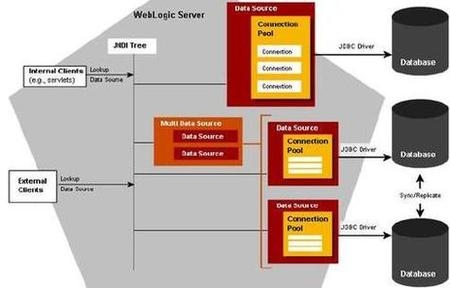
You first create JDBC Datasource (or multi data sources) and then deploy this JDBC datasource (or multi datasource) to WebLogic Server (or cluster) in Domain.
Datasource: contains pool of database connections that are created when datasource instance is created i.e.
a) When it is deployed or targeted
or
b) Server start-up
Multi Datasource : Abstraction around data source to provide load balancing or failover for datasource which are part of Multi Datasource.
.
Who can create JDBC Resource - Administrator or Programmer
How a JDBC resource is created - Using
i) Administration Console (by Administrator)
ii) WLST (WebLogic Scripting Tool) (by Administrator)
iii) by Programmatically using JMX API (by Developer)
System v/s Application JDBC Module - JDBC Modules created by Administrator using Console or WLST are called as System JDBC module where as JDBC module created by developer using WebLogic Workshop, other IDE (Integrated Development Environment) or XML editor are called as Application JDBC Module.
How JDBC Datasource is stored on server - as XML File under $DOMAIN/config/jdbc directory. i.e. $WEBLOGIC_HOME/ user_projects/ domains/ [domain_name]/ config/ jdbc/
config.xml file in “$WEBLOGIC_HOME/user_projects/domains/[domain_name]/config” points to JDBC datasource configuration file via parameter jdbc-system-resource
sample entry in config.xml
<jdbc-system-resource>
<name>JDBC1</name>
<target>AdminServer</target>
<descriptor-file-name>jdbc/JDBC1-1894-jdbc.xml</descriptor-file-name>
</jdbc-system-resource>
which means JDBC configuration file is at “$WEBLOGIC_HOME/ user_projects/ domains/ [domain_name]/ config/ jdbc/ JDBC1-1894-jdbc.xml”
.
Step by Step JDBC resource creation (for database connectivity) in WebLogic Server using Administration Console coming next …
Related Posts for Learn WebLogic with Us
- Oracle WebLogic Installation Steps
- Domain , Administration & Managed Server, Cluster in Oracle WebLogic
- Create Domain in Oracle WebLogic
- Oracle WebLogic Server - Startup/Shutdown
- Oracle WebLogic Server 10g R3 10.3 is out now
- Deploy Application on Oracle WebLogic Server
- Cluster Architecture : Oracle WebLogic Server
- Start WebLogic Server on Linux on port 80, 443 <= 1024
- JDBC (Java DataBase Connectivity ) in Oracle WebLogic - Overview
- WebLogic Server JDBC for Database connection : Step by Step
- Security in Oracle WebLogic : Realm, Security Provider, Authentication, Authorization, Users
- Deploy ADF application to Oracle WebLogic Server
- Node Manager in Oracle WebLogic Server
- Configure Oracle HTTP Server infront of Oracle WebLogic Server mod_wl_ohs
- How to install weblogic server on 64 bit O.S. (Linux /Solaris) ?
- Oracle WebLogic Login Issue : Password is not correct (Password Lock Policy)
- Oracle WebLogic Server : Node Manager in nutshell
- Certification : 1Z0-108 Oracle WebLogic Server 10g System Administrator Certified Expert
- How to integrate WebLogic with Oracle Internet Directory for Login : Authentication
- opatch, adpatch and now “smart update” (BSU) to apply weblogic patches
- Disater Recovery documentation for Oracle WebLogic Server 11g (Fusion Middleware)
- Authentication Providers in #WebLogic - Oracle Access Manager Identity Assertion for Single Sign-On and OAM Authenticator
- Error while starting WebLogic Server : java.lang.NumberFormatException: null
- #WebLogic startup prompting from username password : boot.properties
Popularity: 10% [?]


Good hands-on exercises (installation, patching, cloning), very experienced trainer worth every penny
1 user commented in " JDBC (Java DataBase Connectivity ) in Oracle WebLogic - Overview "
Follow-up comment rss or Leave a Trackback[…] Post This is in continuation of my last post on Database Connectivity (JDBC) in WebLogic Server here , In today’s post I am going to cover step by step JDBC configuration using Administration […]
Leave A Reply