
On popular demand from readers, I am going to cover Workflow Notification Mailer in Oracle Applications R12/12i.
Workflow notification mailer setup in R12 is similar to 11i ( In both release 11i (OWF.H and higher in 11i) & R12 are Java Mailer)
* Previous version of Notification Mailer in 11i was based on C also called as C Mailer
Things to note
1. You use Oracle Application Manager (OAM) to configure Workflow Notification Mailer.
2. There are two kind of Notification (Outbound & Inbound) in Workflow Mailer
3. For Outbound Notification, CM (Concurrent Manager) node should be able to connect to SMTP (Simple Mail Transfer Protocol) server/relay.
4. For Inbound Notification (Optional), CM node should be able to connect to IMAP (Internet Message Access Protocol) Server.
5. Log file for Workflow Mailer Notification are at $APPLCSF/$APPLLOG/FNDC*.txt
6. Workflow Notification Mailer in background run as Concurrent Manager (Workflow Mailer Service, Workflow Agent Listener Service)
7. If you don’t wish to send mail notification to end user (from Dev/Test instance) then configure Test Address in configuration screen.
Step to configure Workflow Notification Mailer
1. Login to Apps R12 with System Administrator Reponsibility
2. under Workflow : Oracle Applications Manager click on Workflow Manager
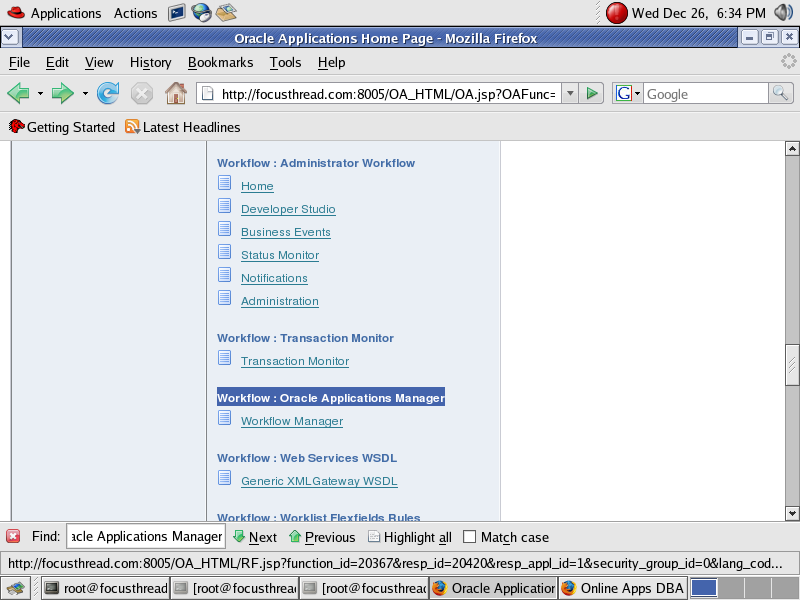
![]()
If this is first time you are configuring Workflow Notification Mailer in Oracle Apps R12/12i you will see Notification Mailers as unavailable as shown in screenshot
Click on Notification Mailers
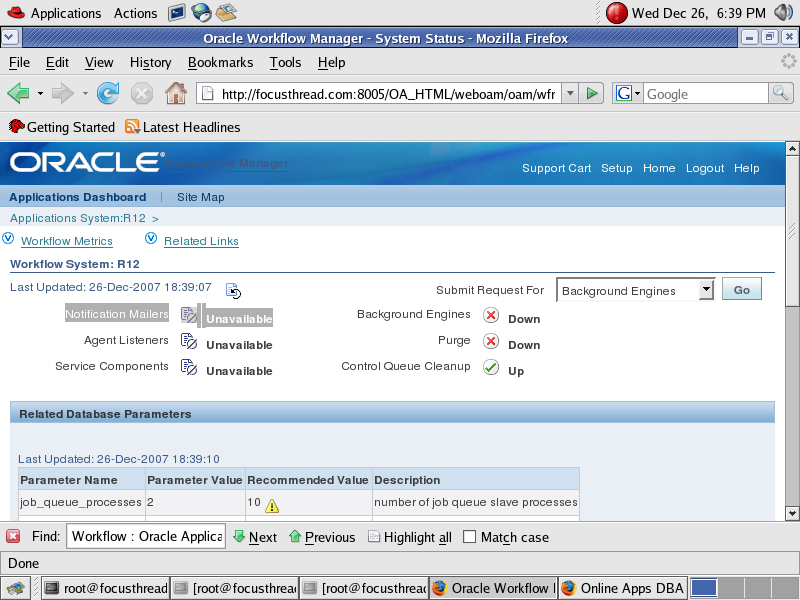
In next screen (as shown below, click on Edit Button)
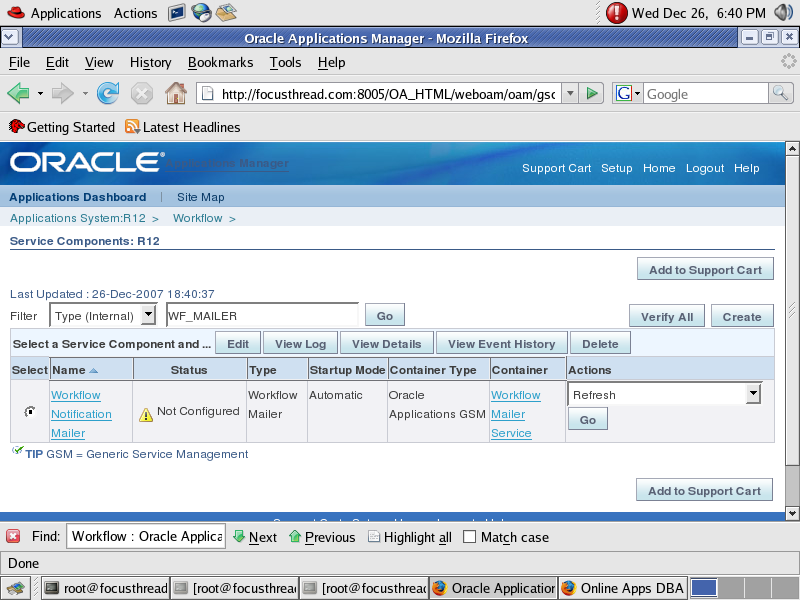
Here you have option to select Inbound notification setup or Just outgoing Notification Setup.
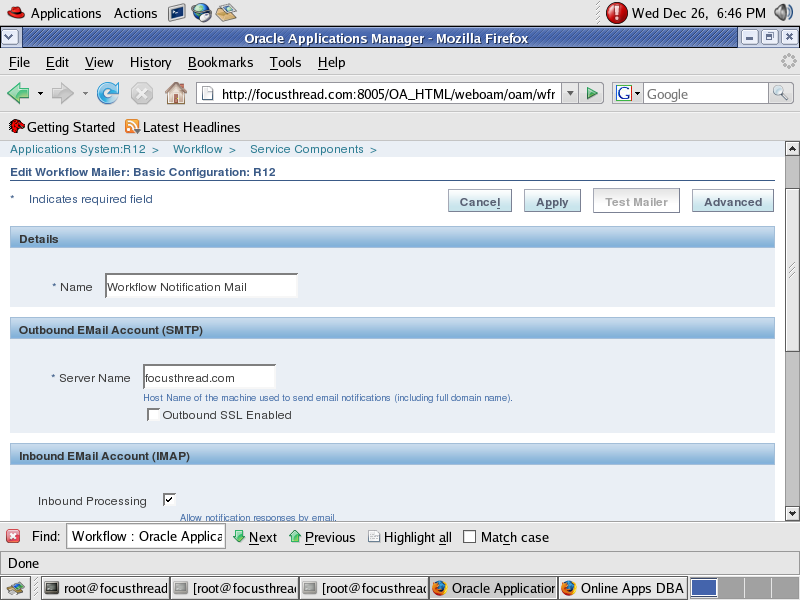
Provide SMTP Server Name (ensure that CM node should be able to connect to SMTP Server or SMTP Relay)
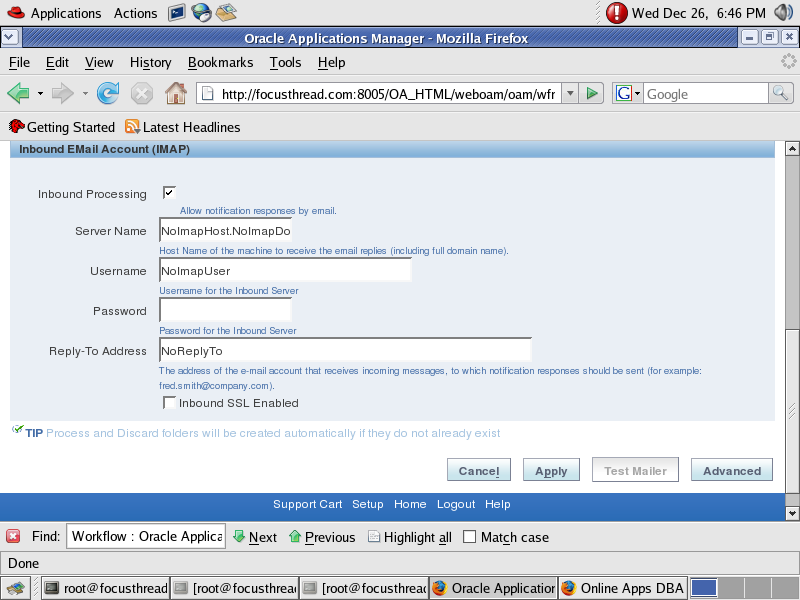
Uncheck Inbound Processing (from above screen), if you don’t wish to configure Inbound Notification Mailer.
If you wish to configure Inbound Notification as well then ensure IMAP Server should be configured with a valid user (create Inbox, Processed & Discard folder for this User)
Click on Apply button to finish configuration, at this stage Notification Mailer will test SMTP Server & IMAP Server connectivity.
For Advanced setup, click on Advanced at top right of configuration screen.
Metalink Notes for Notification Mailer
1. 453137.1 Oracle Workflow Best Practices Release 12 and Release 11i
2. 274764.1 Oracle Workflow Cartridge Workflow Java Mailer Setup Test
3. 433359.1 Tracking Workflow Notification Event Messages
4. 456921.1 Queries Related to Alert and Mailer Integration Post RUP4
5. 454706.1 How to Stop mails from Workflow Notification Mailer


Good hands-on exercises (installation, patching, cloning), very experienced trainer worth every penny 
62 users commented in " Workflow Notification Mailer Setup in Oracle Apps R12/12i "
Follow-up comment rss or Leave a TrackbackI am a young company owner and i need a mailer to advertise my products.
Hi Atul
How to enbale OEM for Oracle11i?
Thanks
umair
Umair,
Here is link to all documentation required for OEM monitoring for 11i
Please note some of these documents are oracle intrenal and you may not be able to open them
393246.1 : Install & config of the Agent 1.2 for EM Grid Plug-In 10gR2 for Oracle Applications
394448.1 Title: Getting Started with the Application Management Pack for Oracle E-Business Suite (Releases 2.0 and 2.0.1)
273579.1 Title: Enterprise Manager Grid Control 10g (10.1.0) Frequently Asked Questions
412044.1 Application Management Pack for Oracle E-Business Suite Release 2.0 and 2.0.1 Troubleshooting Guide
https://metalink.oracle.com/metalink/plsql/docs/E12177_02.pdf (Oracle Application Management Pack for Oracle E-Business Suite – Installation Guide Part No E12177-02 )
https://metalink.oracle.com/metalink/plsql/docs/E12178_02.pdf (Oracle® Application Management Pack for Oracle
E-Business Suite – User’s Guide)
Hi atul
I want to configure workflow purchage notification mailer.We would like to receive my Notifications into my Inbox. Please help me to configure/setup my Oracle workflow Notification Settings for the email server or clinet.
Please assist me to allow the Notifications to be sent to the Required emails automatically after the manager responds to the user’s request.My application version is 12.0.4.
Please explain :What we need to set for below Parameters
Outbound EMail Account (SMTP)
Server Name
Inbound EMail Account (SMTP)
Server Name
Inbound Processing
server Name
User name:
Password:
Reply to address:
Thanks
Abhishek
If you want inbound notification then put IMAP Server details or ignore them
Outbound (System to user)
SMTP (Simple Mail Transfer Protocol) Server or relay should already be configured
Outbound EMail Account (SMTP) – Any email ID which will be used to send mails to users
Server Name – SMTP Server IP/Servername which will be used to send mails to users
Fill this if you want inbound else disable inbound email notification (i.e. from user to system), you should already have IMAP (Internet Message Access Protocol) Server and user configured before this.
Inbound EMail Account (SMTP) – Any valid email account to which mails are delievered
Server Name – IMAP Server Name
Inbound Processing
User name: IMAP Server user name
Password: password you created while creating IMAP User
Reply to address: Address which user will see when he/she click on reply to button from email they receive
Hi Atul
I had configured the workflow mailer but after 8 hrs all the concurrnet request are giving signal 11 error.This error is not comming in the test server.When i disabled the WFNM the production is working fine.
Can please tell me what is the poblem bhind this error and how can I get rid of this problem.
Regards
Lalit
Lalit, Signal 11 means not enough resource which can be because of memory, cpu, display or any other thing.
I never saw signal 11 because of notification mail but still check why signal 11 in CM log file and notification mailer log file to find root cause in $APPLCSF/log
Hi Atul,
Thank you for your imediate response.
Can you please tell how can i resolve this signal11 error.
Please help me i am facing lot of problem due to this issue.
Regards,
Lalit
Hi Atul,
Can u tell us how to find password in Apps R12. In 11i apps password is stored in wdbsvr.app file.
a) Is apps password stored in any file for R12
b) If it is stored in encrypted form, how do we retrieve it.
thanks in advance.
Pavan.
Very good suggestions
Hi Atul,
I have two questions.
1. We have R12 Oracle Apps and in order to configure workflow notifications mailer do we need to configure SMTP & IMAP Oracle server Box or we have to take the IP of SMTP & IMAP from sysadmins Incase if we have to configure can you please guide me how do we go about it ??
2. We want use Workflow notification mailer only for alert manager and not for other modules since we use a pl/sql package to send mail.
Regards
Balakrishna.
1. We have R12 Oracle Apps and in order to configure workflow notifications mailer do we need to configure SMTP & IMAP Oracle server Box or we have to take the IP of SMTP & IMAP from sysadmins Incase if we have to configure can you please guide me how do we go about it ??
SMTP server is required for outgoing mails only
and
IMAP server is required for only incoming mails
If you only want outgoing mails (for alerts) then you don’t need IMAP server at all (In workflow notification mailer configuration screen under “Inbound EMail Account (IMAP)” don’t select check box “Inbound Processing”. By doing this notification mailer will not do any validation for IMAP server and incoming mail processing with not activate.
For outgoing mails, You don’t need to configure SMTP server. Use any existing SMTP server (or SMTP relay server ) (only requirement is that Concurrent Manager should be able to ping SMTP server and port 25 (SMTP server port) should be open between CM node & SMTP server)
2. We want use Workflow notification mailer only for alert manager and not for other modules since we use a pl/sql package to send mail.
Alert manager started using Workflow Notification mailer to send notification from ATG Rollup 4 (check with oracle support/ATG team to confirm)
Hi
I want to install “Oracle Workflow Client for Oracle Applications Release 12 for Windows”.
Is there any patch or any other download link?
Please give me.
Kind Regards
Qamar Zahoor
+923218776877
Hi Atul,
I want to include the url of workflow notification in the email notification so that the user can directly go to the notification page from email notificaiton in rel 12.
How to acheive this?
Thanks
rajesh
Rajesh,
Check workflow developer guide here
For 11i
http://download.oracle.com/docs/cd/B25516_18/current/acrobat/115wfdg.zip
For R12
http://download.oracle.com/docs/cd/B40089_10/current/acrobat/120wfdg.pdf
Hi
I have configured the workflow mailer(11.5.10.2) but the notification test fail with the following msg error :
javax.mail.MessagingException: 501 Sender domain must exist
Any help?
Thanks in advance.
Hakim
Hakim,
Check your source (from) email address and see if you can send mails from o.s. commands from CM node.
Do a quick test like
telnet 25
EHLO
MAIL FROM: testmail@testdomain.com
RCPT TO: your_target_mail@your_target_domain
DATA
Subject:
Type_some_dummy_mail_body_here
. (Type Dot to finish entering data)
quit
Hi,
Thank you for your immediate response.
Find below the result of the test :
——————————————–
EHLO bones.otalgerie.com
MAIL FROM: abdelkrim.kaci@otalgerie.com
RCPT TO: abdelkrim.kaci@otalgerie.com
Subject:
hakimmmmmmmmmmmmmm
.
quit
503 bones.otalgerie.com Duplicate HELO/EHLO
501 Sender domain must exist
503 Need MAIL before RCPT
——————————————–
I count on your help.
Regards
Issue is with SMTP server ,
Are you using exchange , Novel groupwise or any other SMTP server ?
Contact person/team who maintains SMTP server
Hi,
I’m using the smtp of HP-UX server (our Oracle Applications Server)
Regards
Hi,
I want to learn about the significance of the below parameters :
1-Inbound Thread Count
2-Outbound Thread Count
What will be the impact if I change the value of these two parameters
Thanks in advance for your help
Setting Inbound to 0 means notification from User to Workflow Notification Mailer will not work.
Inbound to 1 means Inbound email notification is enabled.
1 means enabled
0 means disabled
Outbound is from Workflow Notification Mailer to User , 1 means enabled and 0 means disabled
Hi,
Thanks a lot.
In “Schedule Event” step I found the below comments:
———————————————-
Enter parameters, separated by a colon (:), in the following format: internal_parameter_name=parameter_value (for example: PROCESSOR_IN_THREAD_COUNT=3:PROCESSOR_OUT_THREAD_COUNT=6).
——————————————
what will be the impact of the use of these parameters on the execution of the event
Thanks for your help
Best Ragards
Which documentation you are following for
“Schedule Event” ?
It is mentioned in “Schedule Event” step in Workflow Manager>Workflow Mailer>Edit.
Hi Atul,
I am new in Oracle Apps.Is there is any document for maintaing and troubleshooting workflow mailer?
Thanx in advance..
Pokhraj
on particular user is getting PO approval intimation twice. this is a workflow generated mails. please suggest or give some action plan.
Dears Atul / Guyes
on ERP 12i we have configured notification mailer succussfully via IMAP and working fine by sending notifications to the users, after sometime the notificatin cannot connect to Exchange Server by saying as below :
Inbound EMail Account (IMAP)
* Server Name= Our Exchange Server
“Unable to make a network connection.”
SSL is enabled
we tested from other server by typing
telnet exchange server 993
connected
but from application server
$ telnet Exchnage IP 993
Trying Exchnage IP…
telnet: Unable to connect to remote host: Connection refused
anyone can help please ?
Alihaddawi, Exchange Server is rejecting connection from Workflow (Concurrent Manager).
Check if there is any firewall between CM node and Exchange Server or ask exchange team to check why exchange server is rejecting connections.
Dear Atul / guys
thanks for your reply, the Exchange Team has indication that there is some other system in the same subnet range is connected both on:
172.30.50.*
and also from other subnet from windows we could connected to the exchange Server successfully.
So the Exchange Team have their prove.
I do appreciate if someone has an idea.
Alihaddawi
@Alihaddawi,
Other option is to check firewall between CM & Exchange
Thanks again,
Since we have other server in the same subnet as dbTier can telnet via 993 port successfully than means there is no Firewall to block it from accessing exchange server.
We have two tiers Scenario of our Oracle Apps.
dbTier responses to telnet exchange id 993
appsTier doesn’t response to telnet exchange id 993
I feel we need Unix Admin has good experience to help ..
BR,
hi atul;
i have setup notification mailer in R12 and now i want to send mail through alert using notification mailer instead using unix send mail option.when i am trying send mail through periodic alert by giving different mail id from that of test override mail address alert is getting completed sucessfully but i am not recieving messages.I have checked notification mailer and recieving messages to test override mail address.So kindly reply at earliest as it is very urgent.
Hi All/atul,
I want to prepare sheel script for monitoring workflow mails if it is struck in the Inbox.Please advise me………..
Hi Atul,
I need one help. I have installed R12.0.4 at my laptop on OS server 2003(32bits). I have to learn workflow so I have installed client(workflow builder). Can I configure workflow mailer in R12 as I m not using internet. I just want to do this for testing purpose only so I could find mailing details in table itlself or send notification to User in R12 instance…to achive this do I require to setup workflow Notification mailer ? if not there what r things I require to do ?
Thanks for help. Waiting ur promp reply!!
Nikhil
@ Nikhil,
If you want to send notifications in user accounts and would like to see those notifications in email server then you need to configure SMTP server (or use existing SMTP server – your CM should be able to connect to SMTP server) and then use configuration notification mailer screen in Oracle Application Manager.
Hi Atul,
Many Many thanks for quick response
I m not DBA so I do not know how to configure SMTP server(for recieving notification to user account in R12). I provide you details of my machine so you can help how to do that…
I log in R12 from http://sumit.ced.com:8003/
I m using following details in host file of
C:\WINDOWS\system32\drivers\etc
127.0.0.1 localhost
127.0.0.1 sumit.ced.com
Please let me know if you need any missing information.
Thanks always
Nikhil.
nikhil.burbure@gmail.com
@ Nikhil
For mail server (SMTP) server on windows, search on google about free SMTP/mail server for windows and then install.
Then configure mail client like outlook express or thunderbird to connect to mail (smtp) server on local machine.
Mail server usually runs on port 25 .
Once you can send and receive mail to your local account (local smtp server) thwen login to OAM (Oracle Application Manager) and configure Workflow Notification Mailer as shown in this post.
Hi Atul,
Need help in WF java mailer configuration for SMTP with authentication.
In detail for outbound SMTP to configured, but this SMTP requires authentication to sendmail and 11i/R12 does not have this provision to provided or to enter username/password for SMTP.
note id=564361.1
BUG:5556540
How to resolve this as security guys will not allow this w/o authentication.
Waiting for your reply ..
Regards
Farhan
can anybody here tell me that how could i configure Reminder of workflow notofcation so that incase of any pending again an automatic reminder to this notification could be generated.
Hi Atul,
I need one help
How to check that CM node is able to connect to SMTP Server .
How to create configured with a valid user IMAP Server.
Regards
Sanjeev
Hi Atul,
As per you1.
For Outbound Notification, CM (Concurrent Manager) node should be able to connect to SMTP (Simple Mail Transfer Protocol) server/relay.
2.For Inbound Notification (Optional), CM node should be able to connect to IMAP (Internet Message Access Protocol) Server.
For CM node need to connect SMTP/IMAP server what confu setup need to be done.
Regards
Sanjeev
@ Sanjeev,
Q1. How to check that CM node is able to connect to SMTP Server ?
From CM node “telnet SMTPServerName SMTPServerPort” (Port for SMTP server is usually 25)
Q2. For CM node need to connect SMTP/IMAP server what confu setup need to be done.
Go to Notification Mailer Setting from Oracle application Manager and define SMTP/IMAP server settings .
Hi Atul,
I’ve do the setup as you mentioned. Now the status of Workflow Notification Mailer is running, but when I Test Mailer to send message to my email, I didn’t get the message on my email
@rr1987,
Check under Logs on CM Node at $APPLCSF/$APPLLOG/FNDC*.txt to find root cause of issue.
We want the from address of particular notifications to be different from the general workflow mailer account. is this achievable ?. If yes, how please
Hi Atul,
How to test IMAP server what we have define in Oracle application Manager is correct.
Regards
Sanjeev
Hello Atul,
Just a quick question. May I know which table stores the details reg. the Inbound and outbound email account (such as the inbound server name, username, protocol etc.) ?
Thanks
Muthu
Hi,
how can i change from address for all outbound emails.
Regards,
How enable smtp in linux
@ akreddy
To configure SMTP server on Linux use this link
http://www.linuxhomenetworking.com/wiki/index.php/Quick_HOWTO_:_Ch21_:_Configuring_Linux_Mail_Servers
Hello
I am using R12(12.1.1) Application ,i want to configure IMAP server on my application.
For this its required separate IMAP server ? or we can configure in SMPT
We have already configure SMPT for outbound and wrking fine..
Please suggest me..Thanx Santu..
Hi,
We are trying to show output of the concurrent request in a notification in R12.
We are using htp.meta to redirect the URL.
This is working in 11i but not in R12.
Could you please help us in this regard.
Thanks in advance
Hi,
We want to configure oracle notification mailer on R12(Linux Server).
Its kind of approval notification,the user should recieve email through which he can Approve/Reject the request from mail itself is this possible?
@ Nile,
Yes this is possible .
What are the steps to achieve this on linux server.?
Can you provide the same for me.
Thanks a Lot.
What are the steps to achieve this on linux server.?
Can you provide the same for me.
Hello All,
I am new to Oracle Apps and learning a lot reading posts on OnlineAppsDBA.com.
Per the blogs:
SMTP server is required for outgoing mails only
and
IMAP server is required for only incoming mails
We have a requirement to send workflow & email notifications to PO buyers & approvers (level-1 and level-2 approvers).
Please advise, if I need to perform any configuration in Purchasing Module in Oracle R12.
thanks.
How do I stop email from parent source. The email will not open or make the commection and the unsubscribe button does not connect either,
Thanks,
Paul
I am getting Performing alert “TEST_ALR” (ROUTINE=alepaa) (FILE=alr/lib/alepea.c) (LINE=1065)
Connecting to “APPS (101)” (ROUTINE=alepaa) (FILE=alr/lib/alepea.c) (LINE=1128)
Performing action set “TEST_ALR_AS” (ROUTINE=alepea) (FILE=alr/lib/alepea.c) (LINE=277)
error and so not able to receive any email notifications as well.
What should be done on this.
Hi, I need help. I requested a password reset and I did it before it expires, however I keep getting notifications to keep reseting it…. what should I do?
Hi –
Is there a script to check the workflow mailer services from unix and bounce them? Sometimes the mailer says it is working fine, but it is not. Restarting the services seems to wake them up.
Thank-you,
S3
Leave A Reply
