
On popular demand from our newbie DBA readers, I am starting Oracle Database Back to Basics series where I am going to cover basic concepts and Architecture of Oracle Database (9i, 10g, 11g)
Today’s post is dedicated to logical storage component of Oracle Database i.e. Data Blocks, Extents and Segment
A. Data Blocks is smallest logical unit to store Oracle Data.
ii) One data block represent specific number of bytes on physical hard disk.
iii) Data Block in Oracle is also called as logical block
iv) Data Block size is usually multiple of operating system block size
v) You can have multiple block sizes with in single database (max. five)
vi) Block Size is specified by initialization parameter DB_BLOCK_SIZE
vii) Format of Data Block is
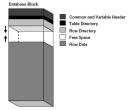
a) Header : contains generic information like block address and type of segment (index, data..)
b) Table Directory : contains information about table having rows in that block
c) Row Directory : contains information about actual row contained in that block
d) Free Space : available space in data block for additional row or update of row which require more space.
e) Row Data : contains table or index data.First three component of data block (Header, Table & Row directory) collectively known as Overhead
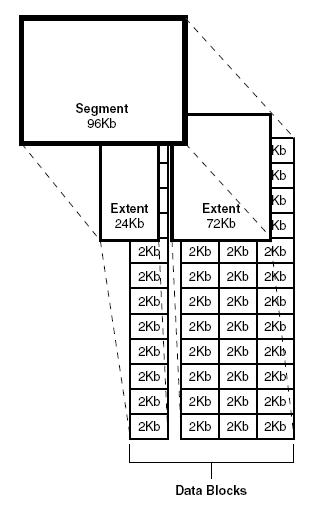
B. Extent is collection of contiguous data blocks.
ii) One or more extents make up a segment.
C. Segment is set of extents allocated for specific data structure (like table or index).
ii) Various kind of segments are table, index, cluster, rollback, temporary …
iii) Important views for segments are dba_segments, user_segments, all_segments
iv) In a Segment, first block of first extent contains segment header information
Things to note w.r.t. Segment, Extent & Datablocks
i) Segment and its associated extents are stored in one table space.
ii) Extents of a segment may not be contiguous on disk
iii) Segment can span multiple datafiles of a particular tablespace (Information on tablespace & datafiles coming soon) but extent can contain data from only one datafile.
Comments are closed.