
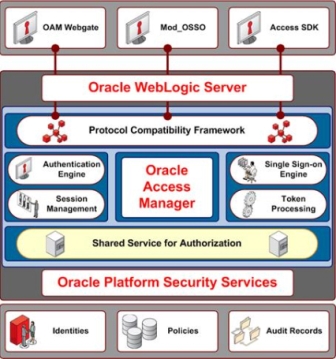
This post covers changes in Oracle Access Manager from 10g (10.1.4.X) to 11g (11.1.1.X).
Oracle Access Manager (OAM) : is Access Management Product acquired from Oblix in 2005.
- Oblix COREid (6, 7) and OAM 10g is written in C++where as OAM 11g is J2EE application deployed on Oracle WebLogic Server (10.3.3+)
- There are two main OAM components in OAM 10g, Access System(Access Server, WebGate and Policy Manager) and Identity System (Identity Server and WebPass). In OAM 11g there is NO “Identity System Component“. Identity related functions are moved to Oracle Identity Manager(OIM) 11g. (OIM is user provisioning and reconciliation product acquired from Thor Xellerate)
- There is NO identityXML interface or Workflow in OAM 11g.
- Access Server in 10g is now called as OAM Server in 11g
- Policy Manager in 10g is now called as OAM Administration Console in 11g
- AccesssGate and WebGate in 10g are now called as OAM Agents in 11g
- Directory Profiles in 10g are now called as User-Identity Store in 11g
- In OAM 10g configurations are stored in LDAP servers where as in OAM 11g configurations are stored in xml file (under webloigic domain) – $DOMAIN_HOME/config/fmwconfig/oam-config.xml
- In OAM 10g Policies are stored in LDAP server where as in OAM 11g you have option to store them either in XML file or in Database.
- In OAM 10g Sessions used to be stateless where as in OAM 11g, user sessions are stateful and stored on Server in OAM 11g (It is possible to leverage Coherence for distributed caching of session data). For more information on Oracle Coherence (earlier Tangosol) click here
- In OAM 11g (by default) Policy Data & User session datais stored in single database (details under $DOMAIN_HOME/config/jdbc/oam-db-jdbc.xml) under one schema however it is possible to configure OAM Policy Data in to one database and user session data in another database.
- OAM Server (Access Server in 10g) in OAM 11g is deployed on WebLogic Managed Server (oam_server1 – default port 14100)
- In OAM 11g, OAM Administration Console(Policy Manager in 10g) is deployed on WebLogic Admin Server (default port 7001)
- URL for OAM Administration Console is http://server:7001/oamconsole (default username/password created during domain creation in weblogic)
- OAM 11g User Interface (UI) is based on Application Development Framework (ADF)
- Three type of Web Agents are supported in OAM 11g -
a) AccessGate/WebGate from 11g
b) AccessGate/WebGate from 10g (for backward compatibility) and
c) mod_osso for Oracle 10g Single Sign-On integration
.
For step by step installation of Oracle Access Manager (OAM) 11g click here
Related Posts for Access Manager
- Integration Steps – 10g AS with OAM (COREid)
- OAS – OAM (Access Manager / Oblix COREid) Integration Architecture
- Oblix COREid and Oracle Identity Management
- Installing Oracle Access Manager (Oblix COREid / Netpoint)
- Oracle Access Manager (Oblix COREid) 10.1.4.2 Upgrade
- Access Manager: WebGate Request Flow
- Introduction to Oracle Access manager : Identity and Access System – WebPass , Webgate, Policy Manager
- Certified Directory Server (AD, OID, Tivoli, Novell, Sun or OVD) and their version with Oracle Access Manager
- Install Oracle Access Manager (OAM) 10.1.4.3 Identity Server, WebPass, Policy Manager, Access Server, WebGate
- Multi-Language or multi-lingual Support/Documentation for Oracle Access Manager (OAM)
- OAM Policy Manager Setup Issue “Error in setting Policy Domain Root” : OAM with AD and Dynamic Auxiliary Class
- OAM 10.1.4.3 Installation Part II – Indentity Server Installation
- OAMCFGTOOL : OAM Configuration Tool for Fusion Middleware 11g (SOA/WebCenter) Integration with OAM
- Oracle Access Manager Installation Part III : Install WebPass
- OAM : Access Server Service Missing when installing Access Manager with ADSI for AD on Windows
- OAM : Create User Identity – You do not have sufficient rights : Create User Workflow
- Password Policy in Oracle Access Manager #OAM
- Changes in Oracle Access Manager 11g R1 (11.1.1.3)
- Agents in OAM 11g (WebGate 10g/11g, OSSO/mod_osso, AccessGate IDM Domain agent) aka PEP (Policy Enforcement Points)
- How to install Patches in Oracle Access Manager 10g : Bundle Patch / BPXX
- Session Management in #OAM 11g : SME , Idle Timeout, Session Lifetime
- Part IX : Install OAM Agent – 11g WebGate with OAM 11g
- How to integrate OAM 11g with OID 11g for User/Identity Store
- How to install Bundle Patch (BP) on OAM 11.1.1.3 – BP02 (10368022) OAM 11.1.1.3.2
- Error starting OAM on IBM AIX : AMInitServlet : failed to preload on startup oam java. lang. Exception InInitializer Error
- OAMCFG-60024 The LDAP operation failed. OAMCFG-60014 Oracle Access Manager is not configured with this directory
- How to Edit (create, delete, modify) Identity Store of OAM 11g from command line (WLST) – editUserIdentityStoreConfig
- OAM WebGate Registration RREG – Resource URL format is not valid
- Blank Screen on OAM 10g Identity Server Console : /identity/oblix
- Oracle 10g/11g webgate software download location
- How to find Webgate 10g/11g Version and Patches Applied
- OAM integration with OIF : Authentication Engine or Service Provider
- OAM 11g integration with Microsoft Windows Active Directory (WNA, IWA, Kerberos) for Zero Sign-On
- OAM 11g : How to change Security Mode (OPEN, SIMPLE, CERT) – WebGate to Access Server Communication
- Forgot Password link on OAM Login Page
- OIM-OAM-OAAM integration – Account Lockout in OAM obLoginTryCount , oblockouttime, MaxRetryLimit
- How to identify which LDAP (OID/AD/OVD) server OAM 11g connects to and as what user ?
- OAM 10g WebGate installation failed with Sorry Invalid User or Invalid Group


Good hands-on exercises (installation, patching, cloning), very experienced trainer worth every penny 
14 users commented in " Changes in Oracle Access Manager 11g R1 (11.1.1.3) "
Follow-up comment rss or Leave a TrackbackWell Done, Atul. Comprehensive and compact.
Hi Atul,
This information is very useful.
You could as well provide details on the migration/upgrade path to 11g OAM and possibly use of it in a few scenarios.Maybe that warrants a new post
Kanti
[...] This post covers overview of Policy Enforcement Points (known as Agents) in OAM 11g. For Step by Step installation of OAM 11g click here and to know about changes in Access Manager (OAM) 11g click here [...]
[...] 1. OAM 10g was stateless application where as in OAM 11g, user session is stateful (For list of difference between OAM 10g & 11g click here ). [...]
Hi Atul,
I wanted to know how the OAM behaves with protected and unprotected URL’s.
Pleas explain how to specify the resource URL’s in OAM 11g.
and is it necessary to have public URL’s for appliction.
Thanks,
Ragu
@Raghu,
Check this
http://onlineappsdba.com/index.php/2007/04/15/access-manager-webgate-request-flow/
and revert back in case of any issues.
Q: Pleas explain how to specify the resource URL’s in OAM 11g.
Step by step coming soon (in 2-3 weeks time)
Q. Is it necessary to have public URL’s for appliction ?
Yes in 11g you must define pubblic (unprotected pages) as by default all pages are secured in OAM 11g
Hi
What is the difference between stateful & stateless sessions?
thanks,
Rahul
@ Rahul,
In OAM 10g and previous release loogged-in/active users information was not stored on OAM server where as in OAM 11g , Access Manager maintains state of users session like who has logged on at what time + if that user is active or not in OAM servers memory (which is distributed to other OAM managed server (in HA deployment) using Coherence solution).
while installing oam Oracle Access Manager 10.1.4.0.1 Identity Server
i am getting following error…
i am installing on ubuntu 10.10 can you please provide solution thank you
The product that you are about to install needs to be owned by a dedicated
user. Only root or the dedicated user may be able to start the service. Most
of the time the server is run as `root’ or `nobody’.
Enter the username the Identity server is running as [nobody] oamuser
Enter the Group for the above username [nobody] oamuser
Press 1 for Next, 2 for Previous, 3 to Cancel or 4 to Redisplay [1] 1
Sorry, invalid user `oamuser’ or invalid group `oamuser’.
Please check and enter again
@ Mohankumar,
As what user you are running Identiy Server installer ?
Do you have user oamuser and group aomgroup already in system
Thanks for the tutorial.How can i edit identify store from command line?Please tell me.
@ vanita singh ,
Use WLST edituseridentitystore as explained here
http://onlineappsdba.com/index.php/2011/05/26/how-to-edit-create-delete-modify-identity-store-of-oam-11g-from-command-line-wlst-displayuseridentitystoreconfig-edituseridentitystoreconfig-createuseridentitystoreconfig-deleteuseridentit/
[...] Single Sign-On (SSO) solution from Oracle and there are two versions of OAM i.e. 10g and 11g. More here on differences between OAM 10g and 11g [...]
Hi Atul,
This post is very helpful for me. Thanks so much.
But I have an another question:
How to get user information if there is NO identityXML interface in OAM 11g?
Thanks,
Alan
Leave A Reply