
Leave a Comment:
20 comments

Hi Mahendra,
I have integrated OAM 11g-EBS R12.1.3 by following Atul and Neha’s EBook “Oracle E-Business Suite (R12)Integration with OID/OAM 11g” (my environment is similar to this doc). And added a new EBS instance to the existing OAM. Now, I have a problem…as the new EBS instance is in https I have to run OAM also in https(as per DOC 1309013.1). Following are my doubts..
1. In order to redirect my https EBS url to https OAM login, do I need to enable all the middleware softwares(OID, WLS and OAM) in SSL mode??
2. Or only OHS must be SSL enabled ?
Regards,
Viswanath.P.R

@ viswanath,
Q: as the new EBS instance is in https I have to run OAM also in https
A: No, This is not true. What document 1309013.1 says is that if EBS middle tier is running in SSL then it is recommended to configure WebLogic Server on which AccessGate is deployed to SSL (This is different from configuring SSL for OAM)
All you need to do is either configure SSL for OHS which will then forward request to Weblogic Server (in which AccessGate is deployed) to Non SSL
or
configure SSL for OHS & WebLogic Server on which Access Gate is deployed in SSL. Communication from user to OHS and OHS to weblogic Server (in which AccessGate is deployed) is all SSL in this case.
WebGate to OAM is still non SSL in both case above.
If your requirement is to configure SSL everywhere then you must run OAM server in SECURE mode and change webgate from OPEN to CERT
As you have already purchased our book, feel free to call me on my mobile (as per London timezone) and I’ll be happy to explain this.
Please go through chapter 1 of our eBook
Reply @ viswanath,
Your other two doubts
Q1. In order to redirect my https EBS url to https OAM login, do I need to enable all the middleware softwares(OID, WLS and OAM) in SSL mode??
A: No, that is not mandatory.
Q2. Or only OHS must be SSL enabled ?
A: Only OHS on SSL should be enough but check your security requirement.
If you have hardware load balancer with SSL termination , then you can terminate SSL at load balancer only and OHS then will be running on non SSL
Reply Hi Atul,
I have initiated the process of enabling SSL for OHS. And in the process I have performed following steps..
1. Created wallet using OWM as per DOC 1226484.1
2. Modified ssl.conf as per DOC 1226933.1
3. Restarted OHS and OAM
But still my EBS URL is redirecting to SSO url which is in http but not to https.
Do I need to make anything more to make EBS URLto redirect to HTTPS of SSO/OAM url??
To be more clear on my previous question..
How to make EBS URL to look for HTTPS of SSO/OAM login page??
when I type EBS URL https://ebs_hostname:4449/ —->is redirecting to—-> http://oam_hostname:7777/ebsauth_ezir12/…
where as it should goto https://oam_hostname:4443/ebsauth_ezir12/…
as 4443 is https port for OHS
To achieve this do I need to change anything in oamconsole or EBS??
Reply @ viswanath,
I am assuming that when you say http://oam_hostname:7777/ebsauth_ezir12/… here oam_hostname is machine on which OHS is running .
7777 is non -ssl port of OHS and 4443 is SSL port of OHS.
You want EBS to redirect to authentication on URL https://oam_hostname:4443/ebsauth_ezir12/OAMLogin.jsp
If this is the case then you should change profile option Application Authentication Agent URL value and bounce EBS middle Tier
Reply Hi it worked after making following changes…
1. ‘Application Authenticate Agent’ profile in EBS to https://oam_hostname:4443/
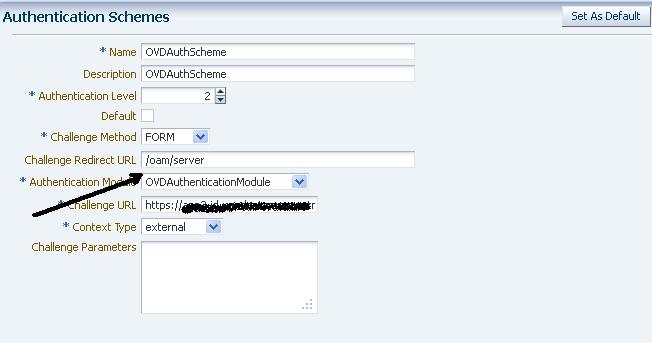
2. changing the ‘challenge URL’ in oamconsole –> Authentication schemes to https url
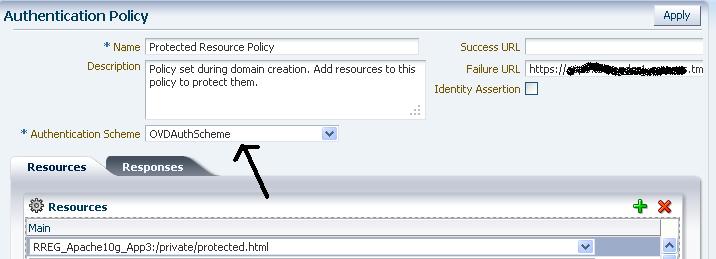
3. changing protected resource policy –> failure url to https url.
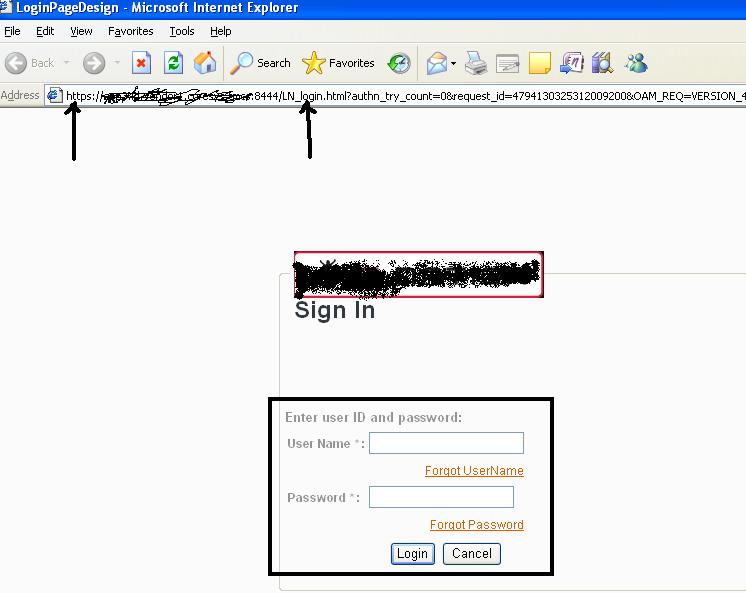
Now, the EBS https url is redirected to sso/oam https url.
Reply
Please provide me some high level steps to integrate HTML application with OAM 11g
Thanks in Advance
Kiran Kumar
Reply
Hi Atul,
I have successfully completed the configuration for EBS SSO with Access Manager using your ebok, however I am pretty confused as to how to enable SSL for the whole set of components.
Can you please provide high level steps?
Thanks
Vivek

Hi Atul,
My application is running in SSL Port. I need to send ObSSOCookie to my application thru HTTP Header.
Can I protect my application using Security Level Open?
If not what are all the steps to protect my application.
Currently i created webgate with Simple security level. In MOD_wl_ohs.conf file i specified wlproxyssll on and in weblogic server i enabled weblogic plugin.
SetHandler weblogic-handler
WebLogicHost hostname
WeblogicPort port
WLProxySSL ON
WLProxySSLPassThrough ON
when accessing the application via http port i am getting
Please help me to resolve the same. I am very much new to OAM.
Reply when accessing the application via http port i am getting below error in the application server log
The browser shows
Failure of server APACHE bridge:
No backend server available for connection: timed out after 10 seconds or idempotent set to OFF or method not idempotent.
Reply @ Saravanan,
Either weblogic managed server is not running or virtual host entry (if using OHS) is not correct.
What URL do you see in browser when you see this message ?
Is weblogic managed server running ?
Are you accessing URL via virtual host (OHS server name is different and URL you are using in browser is different) ?
Reply Thanks for your quick response.
My Managed Servers are running. I am accessing the URL via ip address of the OHS server. (in my case both all servers are running in same machine)
I am accessing http://hostname:7778/myApp. The oam webgate redirects to credential collector after that the same URL available in browser and getting “No backend server available for connection: timed out after 10 seconds or idempotent set to OFF or method not idempotent.”
Reply
Hi Atul,
I configured Webgate 11g Agent in Simple mode. When i try to access the protected URL, system is throwing the above error. The protected URL is running SSL enabled. In the app server log i found the error as ”
Need your help to resolve the same..
Reply Plaintext data for protocol HTTP was received from peer***** instead of an SSL handshake.
Reply Plaintext data for protocol HTTP was received from peer (hostname) instead of an SSL handshake.
is the error message.
Plaintext data for protocol HTTP was received from peer …. instead of an SSL handshake.
is the error message displayed in the app server log.
Plaintext data for protocol HTTP was received from peer ***** (hostname)*** instead of an SSL handshake.
Reply
Hi Atul, In my case I have done the EBS – OAM SSL off load through LB. And I have set the,
EBS Authenticate agent value to : https://LBHOST/ebsauth_PEF/ -> This is point to:
http://oamhost:7778/ebsauth_PEFTEST/
But it is not redirecting authenticate page to the https url.
And I am using authentication schema as ” EBSAuthScheme”
Challenge Redirect URL : /oam/server/
Challenge URL : /pages/login.jsp
What king of a change I would do in OAM or EBS?
Thanks.
Reply