
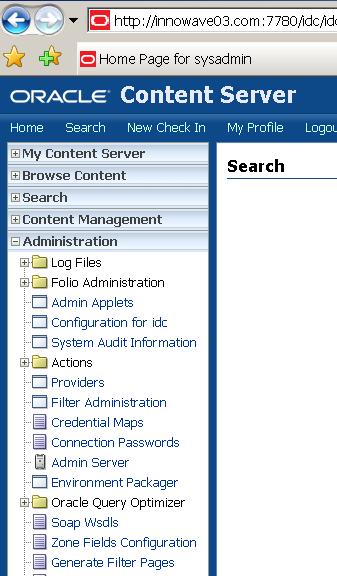
Yesterday We saw Oracle Content Server (Repository and Core Services for Universal Content Management) installation, We used Apache (Oracle HTTP Server) as Web Server and Oracle as Database.
We selected configuration to Web Server and database with Content Server Installation so lets try to login into Oracle Content Server.
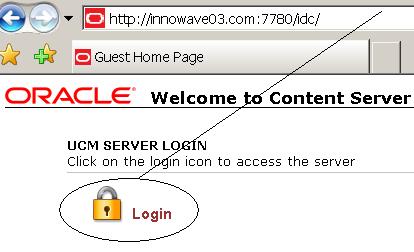
Use http ://serverName:webPort/server_alias where
–ServerName (WebServer Hostname) - innowave03.com
–WebPort (Web Server Listen Port) - 7780
–ServerAlias (During CS installation) - idc
On typing this URL I got page not found. I checked and found that CS (Content Server) related files were missing in httpd.conf (Web Server Configuration File).
Looked at Content Server documentation carefully and found this line hidden some where deep in installation document
“Since Apache cannot be configured automatically by the Content Server installer, you need to do it manually”
So time to configure Web Server Manually
.
Attempt 1. Configure Web Server (Oracle HTTP Server) with UCM Content Server
1. Add following lines at end of httpd.conf (I was using Web Server from Oracle Application Server version 10.1.3.1 )
LoadModule IdcApacheAuth [Webserver_Filters_Path]/IdcApache2Auth.so
IdcUserDB [Master_Instance] “[User_Data_Dir_Path]/userdb.txt”
Alias /[Rel_URL_To_Master] “[Path_To_Master_Webl.]”
<Location /[Rel._URL_To_Master]>
Order allow,deny
Allow from all
DirectoryIndex portal.htm
IdcSecurity [Master_Instance]
</Location>
In my case
LoadModule IdcApacheAuth /oracle/apps/ucm/mid/content/103/shared/os/linux/lib/Idc
Apache2Auth.so
IdcUserDB idc “/oracle/apps/ucm/mid/content/103/data/users/userdb.txt”
Alias /idc “/oracle/apps/ucm/mid/content/103/weblayout”
<Location /idc>
Order allow,deny
Allow from all
DirectoryIndex portal.htm
IdcSecurity idc
</Location>
2. Bounce Apache like
(I was using Web Server from Oracle Application Server version 10.1.3.1 )
opmnctl stopproc ias-component=HTTP_Server
opmnctl startproc ias-component=HTTP_Server
3. OPMN failed to start HTTP Server ($OH/opmn/logs/HTTP_Server~1.log) with below error message
Cannot load /oracle/apps/ucm/mid/content/103/shared/os/linux/lib/IdcApache2Auth.so into server: /oracle/apps/ucm/mid/content/103/shared/os/linux/lib/IdcApache2Auth.so: undefined symbol: apr_bucket_type_pipe
This was because Content Server is certified on Apache 2.0 and higher where as HTTP Server shipped with Oracle AS 10.1.3.1 is using Apache 1.3.1.
Thanks to Guide here , HTTP Server in Oracle Application Server 10.1.3 Companion CD is build on Apache 2.0.
.
(I don’t know why I was in favour of using Oracle HTTP Server)
.
Attempt 2. Install Oracle HTTP Server with Apache 2
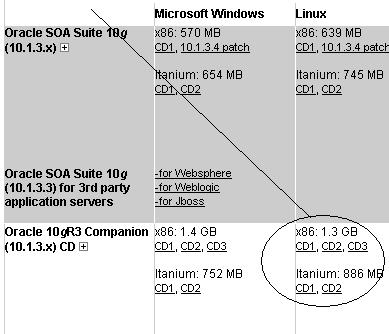
1. I downloaded Oracle AS 10g R3 Companion CD from Here
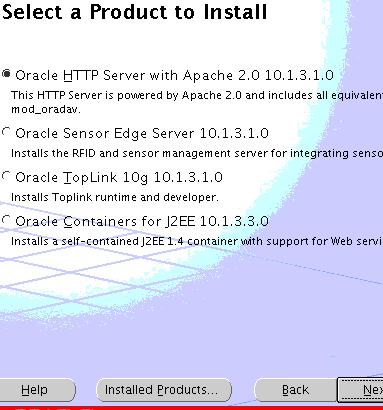
and did HTTP Server install in new ORACLE_HOME
Added following lines in httpd.conf (In this version httpd.conf is in$OH/ohs/conf)
LoadModule IdcApacheAuth /oracle/apps/ucm/mid/content/103/shared/os/linux/lib/IdcApache2Auth.so
IdcUserDB idc “/oracle/apps/ucm/mid/content/103/data/users/userdb.txt”
Alias /idc “/oracle/apps/ucm/mid/content/103/weblayout”
<Location /idc>
Order allow,deny
Allow from all
DirectoryIndex portal.htm
IdcSecurity idc
</Location>
I was able to start HTTP Server (opmnctl startproc ias-component=HTTP_Server) but on accessing login page http://innowave03.com:7780/idc , page not found.
error_log in $OH/ohs/logs dumping “segmentation fault”
[Wed Sep 24 21:44:00 2008] [notice] child pid 5245 exit signal Segmentation fault (11)
[Wed Sep 24 21:44:20 2008] [notice] child pid 5246 exit signal Segmentation fault (11)
[Wed Sep 24 21:44:40 2008] [notice] child pid 5247 exit signal Segmentation fault (11)
On commenting below two lines in httpd.conf, I could see login page but page not found on clicking Login LockIdcUserDB idc “/oracle/apps/ucm/mid/content/103/data/users/userdb.txt”
IdcSecurity idc
.
.
On searching Metalink, I found this Bug # 7171250 INCORPORATING SUPPORTED FILTER FILES FOR INSTALLING CS WITH ORACLE HTTP SERVER
.
It was time to go back to basic Apache here .
.
Attempt 3. Configure Content Server with Standalone Apache 2.0 (Successful) Configured Apache with Linux (/etc/httpd) to connect to Content Server. Default Apache (under linux) uses port 80, whereas I defined port 7780 during Content Server installation so changed Listen Directive in httpd.conf(/etc/httpd/conf) from 80 to 7780
Added below lines in httpd.conf for Content Server
LoadModule IdcApacheAuth /oracle/apps/ucm/mid/content/103/shared/os/linux/lib/IdcApache2Auth.so
IdcUserDB idc “/oracle/apps/ucm/mid/content/103/data/users/userdb.txt”
Alias /idc “/oracle/apps/ucm/mid/content/103/weblayout”
<Location /idc>
Order allow,deny
Allow from all
DirectoryIndex portal.htm
IdcSecurity idc
</Location>
Bounced Apache
/usr/sbin/httpd -k stop
/usr/sbin/httpd -k start
.Access Content Server
Access Oracle Content Server using URL http://webserver_host:webserver_port/server_alias
.
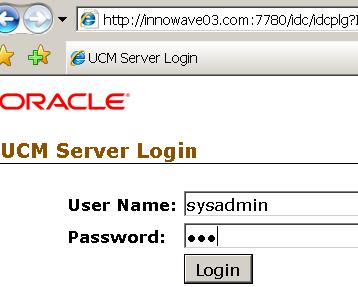
Try UserName/Password as sysadmin/idc
Start / Stop Oracle Content Server (UCM), Security in Content Server , Configuration of Web Module (Web Content Management, Records Management …) coming soon….
Related Posts for UCM
- Oracle Universal Content Management Architecture
- Oracle Content Server (UCM) installation overview
- Oracle UCM Content Server Installation on Linux : Step by Step Doc - Part I
- Configure Apache (Oracle HTTP Server) with Stellent Content Server (UCM) - Part II
- Security (Users, Groups, Accounts) in Oracle Content Server (ECM/UCM)
Popularity: 12% [?]


Good hands-on exercises (installation, patching, cloning), very experienced trainer worth for Money 
9 users commented in " Configure Apache (Oracle HTTP Server) with Stellent Content Server (UCM) - Part II "
Follow-up comment rss or Leave a TrackbackHi,
I have to install Stellent where I need to use Weblogic application server. I wanted to know that when I am using one application server is it necessary to install a webserver also.
Please also do let me know what configuration I will need to do in both the servers, Application server and web server.
Kindly help.
Hi,
Installation of Web Server (HTTP Server) in front of apps server (weblogic) is not required as Apps Server (weblogic) can also act as Web Server having said that there are some benefits of putting Web Server (HTTP Server) on different node in front of apps server like
Extra security & Reverse proxy
First you check with architect how he wish to design solution and then apply accordingly.
Which components in Stellent you are planning to use ?
We would be installing entire UCM. Need to migrate content from UCM to other repository.
For this purpose I need write a program which will extract content, related metadata, security system and WF information.
Please suggest should I use Webservices or CIS API.
The program should be able to run on any app server.
Thank you,
Ravi
Hi,
When tried to connect LDAP with UCM that time error was occurred.
I am using redhat linux 4 server also i have more doubts,
did i configure ldap in my(linux) server? or would i install OID?
Where i can find following attributes..
Provider name:
provider description:
Provider class:
Source path:?
LDAP server:?
LDAP port: In Which server port i want to give?
LDAP suffix:?
LDAP admin DN:?
LDAP admin password:?
Where i will get this resource?
Am new for this one please help me.am now critical suituation.
ERROR:
LDAP Provider Information forLDAP_NEW Provider Name: LDAP_NEW
Provider Description: ldap connection
Connection State: 0 out of 5 connections are good
Connection Error: Error connecting to LDAP server ldap://172.19.0.25:389. Make sure LDAP server is running on specified port and hostname. Error returned is: failed to connect to server 172.19.0.25:389
Last Activity Date: 11/29/08 10:19 AM
——————————————————————————–
Provider Type: ldapuser
Provider Class: intradoc.provider.LdapUserProvider
Provider Connection: intradoc.provider.LdapConnection
——————————————————————————–
Source Path: /yant/oracle/UCM/server/data/providers/ldap
LDAP Server: 172.19.0.25
LDAP Suffix: o=yantro,dc=com
LDAP Port: 389
——————————————————————————–
Number of connections: 5
Connection timeout: 10
Priority: 1
Credential Map: http://www.yantro.com
Use Netscape: Yes
SSL Enabled: No
——————————————————————————–
Attribute Map:
Role Prefix:
Account Prefix:
Default Network Accounts:
Account Permissions Delimiter:
Default Network Roles: admin
Filter Groups: Yes
Use Full Group Name: Yes
——————————————————————————–
LDAP Admin DN: sysadmin
Thanks
Lakshmi
Laxmi, You first need to find out which ldap server you need to connect ?
Is this OID or openldap , sun’s iplanet or something else.
Then you need to find out if ldap server is already existing or need to install new .
Once you identify ldap server you should be able to get answer to all your queries
Hello,
I use CONTENT SERVER 10g, with OID.
users in oid: cn=users,dc=oid
groups in oid: cn=group,dc=oid
created users oid: cn=testuser,cn=users,dc=oid
admin group in oid for CS: cn=admin,cn=group,dc=oid
… in CS created LdapProvider, for External Authorization, new created user, can login success, but admin tabs exist. in CS roleprefix like cn=group[1], LdapSuffix like dc=oid… why user have no admin privileges… user included in the ‘admin’ group.
hi, why idc? what do you mean idc?
@ kensou,
IDC is alias which you define during UCM installation (You can use any alias of your choice and idc is default alias)
This alias is mapped to weblayout directory to generate HTML pages.
Check http://onlineappsdba.com/index.php/2008/09/23/oracle-ucm-content-server-installation-on-linux-step-by-step-doc-part-i/
Just above point 4 in section “Oracle Content Server (repository & Core Services for UCM) Installation”
I configured Apache 2.2 with UCM but still getting page not found issue when i click on login link. Only first page is coming.
Pls help.
Leave A Reply