

Leave a Comment:
64 comments

[…] For more information on RCU click here […]
Reply […] 4.6 Select Create Schema – You can create schema in advance as well (by running RCU more information here) […]
Reply […] 2. Load/Create schema (webcenter, portlet, ocserver, discussions, wiki) in database using RCU (Repository Creation Utility) more information here […]
Reply […] fusion, soa, webcenter Print This Post RCU – Repository Creation Utility (more information here ) is certified only on Windows and Linux , then how to create schema on database running on […]
Reply
our SOA repository database is always getting full, we dont know how to solve this issue and we dont even testing the production yet. i was try to find it, i found how to reduce it in 10g version of SOA Suite. which is BPEL Performance tuning, we can reduce the growth repository during execution time with some change in bpel.xml (completionPersistPolicy ) i’m sure that i cant find the bpel.xml in SOA Suite 11g. our repository is always full, and if it full, the composite execution will be failed.. may you guys can help me with it?
PS: For testing we use real data in production which triggered into our dummy staging database
thanks
Reply
Where can I donwload rcu 11.1.1.0? Its not on the Oracle downloads page
Reply
@ Ayesha, Why don;t you use 11.1.3.0 ? You can use 11.1.1.3.0 RCU with 11.1.1.1.0 and 11.1.1.2.0 products as well.
Reply
In OEL5.3- I installed oracle 11.1.6.0 patched to 11.1.7.0 .While creating RCU I am getting this
——–
Error : Unable to connect to the database using the provided details. Please enter a valid hostname and port or check if the listener is up and running.
I was assuming RCU does not recognize localhost.localdomain
In etc/hosts :127.1.1.0 localhost.localdomain
I added 174.10.10.10 xyz.com xyz
Also I changed in etc/sysconfig/network
It’s not working
Couldn’t find much in google. Am I missing any post installation steps after installing oracle 11g db.
I gave the port no :1521 and SID:orcl
DB is up and running
Can any one provide me a solution
Reply
Hi,
i installed Jdeveloper 11.1.1.3 and also updated SOA Suite. At the time of installation i have oracle 9i. After that i removed and installed oracle 10G database.
when creating weblogc domain i am getting the below errors.
Component Schema=SOA Infrastructure
Driver=oracle.jdbc.xa.client.OracleXADataSource
URL=jdbc:oracle:thin:@localhost:1521/orcl
User=DEV_SOAINFRA
Password=************
SQL Test=select 1 from schema_version_registry where owner=(select user from dual) and mr_type=’SOAINFRA’ and version=’11.1.1.3.0′
ORA-01017: invalid username/password; logon denied
CFGFWK-60850: Test Failed!
Component Schema=User Messaging Service
Driver=oracle.jdbc.OracleDriver
URL=jdbc:oracle:thin:@localhost:1521/orcl
User=DEV_ORASDPM
Password=************
SQL Test=select 1 from schema_version_registry where owner=(select user from dual) and mr_type=’ORASDPM’ and version=’11.1.1.2.0′
ORA-01017: invalid username/password; logon denied
CFGFWK-60850: Test Failed!
Component Schema=OWSM MDS Schema
Driver=oracle.jdbc.OracleDriver
URL=jdbc:oracle:thin:@localhost:1521/orcl
User=DEV_MDS
Password=************
SQL Test=select 1 from schema_version_registry where
owner=(select user from dual) and mr_type=’MDS’ and
version=’11.1.1.2.0′
ORA-01017: invalid username/password; logon denied
CFGFWK-60850: Test Failed!
Component Schema=SOA MDS Schema
Driver=oracle.jdbc.OracleDriver
URL=jdbc:oracle:thin:@localhost:1521/orcl
User=DEV_MDS
Password=************
SQL Test=select 1 from schema_version_registry where owner=(select user from dual) and mr_type=’MDS’ and version=’11.1.1.2.0′
ORA-01017: invalid username/password; logon denied
please do the needful.
Thanks in advance.
Regards,
Purushotham
@ Purushotham,
Either password you are using to connect to database for schemas dev_soainfra, dev_mds …. is not correct or schema itself is not available.
Connect as sys or system or sqlplus “/as sysdba”
and then check if you have schemas related top soa in database
SQL>select username from dba_users where username like ‘DEV%’;
If schemas are in place and you don’t remembre password then reset them using
SQL> alter user [username] identified by [new_password];
Reply […] RCU – Repository Creation Utility is java based tool (available only for Windows and Linux) to create schema in Database. For basics on RCU (Repository Creation Utility) click here […]
Reply […] Create OBIEE schema (BIPLATFORM + Metadata Services) using Repository Creation Utility (RCU). More on RCU here […]
Reply
What are the minimum list of RCU components that needs to be selected for a Portal install?
Reply @ Nate,
For Portal 11g, you need portal and portlet schema
Portal 11g requires OID (10g or 11g) & OSSO (10g) – If you are planning to use OID 11g then include ODS schema too (ODS schema you can install during OID 11g installation as well)
Check URL
http://download.oracle.com/docs/cd/E14571_01/doc.1111/e14259/rcu.htm#BABJBCIG
[…] 2. In OAM 11g User Session Data is stateful and stored at following places a) Local In-Memory Cache of each Managed Server on which OAM is running (oam_server1 on port 14100) b) Distributed In-Memory Cache shared by all Managed Server on which OAM is running (For OAM 11g deployment in Cluster) using Coherence c) Optionally in Database (under schema [prefix]_OAM created using RCU). To know more about RCU here […]
Reply […] 2. Create Schema using RCU (For OID You can create schema during OID install stage too). RCU is supported on Linux and Windows only. More information on RCU here […]
Reply
Hi Atul,
I want to install the schema for ODI and I have installed the 11.2 standard Oracle database software only, without any sample database. Can you tell me what my next step should be?
I am absolutely an novice in terms of knowledge about Oracle and I would like to learn ODI. I have been working on other integration technologies.
I need some guidance regarding the install. I have downloaded 11.2.0.1 database and have got the RCU tool and also the ODI download.
Initially, I installed Oracle database software only(Win 2003 server). I have not created the standard sample database.
As per the installation instruction we need to create the repository first, before doing ODI. When doing so I get a screen that is asking for database hostname, etc. etc.
My question is: Do I need to create a database using the Oracle database config assistant first? If yes, should it be a “General Purpose or Transaction Processing” database or should it be a “Custom database”.
If the answer to the above is ‘no’, then what should be the parameters for ODI?
Apart from this, if you know some link, where I can find documentation that goes through the process of installation from start to end and can send me the link or something, I would be very grateful.
ODILEARNER
Reply @ Manish, Yes you will have to create a database which you can create using DBCA (Database Configuration Assistant) .
Select Transaction Processing .
Create listener as well using net configuration assistance (netca).
Once you have database and listener then use those details in like hostname , port in RCU screen.
Reply For latest RCU 11.1.1.X download link
http://www.oracle.com/technetwork/middleware/downloads/fmw-11-download-092893.html
Reply
Hi,
While installing on linux it get the following error
RCU-6093:Skipping Main operation: Failed in SchemaTablespace step validation
RCU-6131:Error while trying to connect to database.
It worked earlier. Was trying to drop and recreate and its not happening. login as SYS always gives invalid username/password
@ Padma,
Q: login as SYS always gives invalid username/password
A: This could be because of two reasons
1. You are not using correct password (check if sys password is correct )
On DB server login to user owning database , usualy oracle and run this command
sqlplus sys/sys_password as sysdba
If you get password error then password is wrong and then reset password as
sqlplus “/as sysdba”
SQL> alter user sys identified by new_password
2. If sys password is correct then sys user need password file on database server and access to connect remotely
Check this link http://www.dbasupport.com/forums/archive/index.php/t-24741.html
Reply Hi,
Recreating the password file helped. Install went on well. Last week it worked. This time password file had to be recreated. Not sure why sudden change.
Regards
Padma

@ taveller,
Yes RCU support silent install
rcu -silent -createRepository -connectString database_connect_string -dbUser -database_user -component component
Check this http://download.oracle.com/docs/cd/E14571_01/doc.1111/e14259/rcu_silent.htm#RCUUG250
Reply
Hi Atul,
I am facing several errors like ” ctxapp” role doesnot exist etc., while creating a repository for ECM using RCU on a database which was created manually with the create database script.
I’ve run catalog.sql, catproc.sql after the database got created. Please let me know if I am missing any script to be run before running RCU to get ctx related objects.
Reply @ ranganathnangineni,
Which database you are using as ECM repository ?
If this is Oracle Database then any reason for running manual sql’s and not using RCU directly ?
Reply Atul,
This is an Oracle RAC database. We have created this database using create database command, we didnt use DBCA.
While running RCU to create a repository , it is throwing errors related to ctxapp role, ctxsys objects. Then I suspected , the catalog.sql, catproc.sql didnt create any objects related to ctx.
Could you please guide me?
Reply @ ranganathnangineni,
For Oracle Databae, RCU expects CTX (Orcale Text). Make sure that you install ctx during database creation or later but before RCU.
– cd $ORACLE_HOME/ctx/admin/
– Install: sqlplus “/ as sysdba” @catctx CTXSYS CTXSYS TEMP NOLOCK
[…] Create OBIEE schema (BIPLATFORM , MDS) using RCU , more on RCU here (RCU is currently available for 32 bit Linux and Windows […]
Reply […] 2. Run RCU to create ODI schema, more on RCU here […]
Reply
Hi Atul ,
We have created a Fusion Middleware environment for DIsocverer . everything went on fine . it ran for two weeks . suddenly our database got correpted and our DBA team dropped the Database. In this database we have created the Repositiry using RCU . now when we are going to the discoverer login page it is givng the errror as it is pointing and searching for the lost databse. we have created a new database and created a new repository . we dont want to uninstall and reinstall again from scratch but just want to map the new repository instead of the new one . is there any chance to do this approach ?
Please let me know . we appreaciate your thoughts on this . its a kind of urgent
Thanks
Kanna

Hi Atul,
I need to install Oracle Discoverer on 64 bits, I don’t want to install Oracle Fusion Middleware because I only need Discoverer. Do you know if its possible download just Discoverer 11g for 64bits? on this web http://www.oracle.com/technetwork/middleware/downloads/fmw-11-download-092893.html appears Oracle BI Discoverer Desktop and Discoverer Administrator 11.1.1.3.0, but this version is for 32 bits, Do you know if exits any plug-ins for convert it on 64 bits?
Thanks!
@Lilen,
I hope you want discoverer server and not client
64 bit Discoverer Software is available here http://www.oracle.com/technetwork/middleware/downloads/fmw-11-download-092893.html
Note: weblogic is mandatory as weblogic is application server on which discoverer server runs
Reply
Hi…I need some questions regarding the RCU installation. I’m installing FMW 11gR1(Portal, forms, reports and discoverer) and one of the required software was RCU. I got some issue in loading portal schema, no issue was encountered for the discoverer and portlet producer. In this case is it possible to create portal schema and its objects manually?
Portal log:
Error: ORA-3114, ORA-3113 and ORA-07445
old 1: grant EXP_FULL_DATABASE to &&1
new 1: grant EXP_FULL_DATABASE to DEV_PORTAL
Grant succeeded.
old 1: grant execute on dbms_crypto to &&1
new 1: grant execute on dbms_crypto to DEV_PORTAL
Grant succeeded.
old 39: grant_strings(1) := ‘grant execute on owa_vpd_ctx to &&1 with grant option’;
new 39: grant_strings(1) := ‘grant execute on owa_vpd_ctx to DEV_PORTAL with grant option’;
old 40: grant_strings(2) := ‘grant execute on dbms_sys_sql to &&1 with grant option’;
new 40: grant_strings(2) := ‘grant execute on dbms_sys_sql to DEV_PORTAL with grant option’;
old 41: grant_strings(3) := ‘begin dbms_java.grant_permission(upper(”&&1”), ”SYS:java.net.SocketPermission”, ”*”, ”connect,resolve”); commit; end;’;
new 41: grant_strings(3) := ‘begin dbms_java.grant_permission(upper(”DEV_PORTAL”), ”SYS:java.net.SocketPermission”, ”*”, ”connect,resolve”); commit; end;’;
old 42: grant_strings(4) := ‘begin dbms_java.grant_permission(upper(”&&1”), ”SYS:java.util.PropertyPermission”, ”http.proxyHost”, ”read,write”); commit; end;’;
new 42: grant_strings(4) := ‘begin dbms_java.grant_permission(upper(”DEV_PORTAL”), ”SYS:java.util.PropertyPermission”, ”http.proxyHost”, ”read,write”); commit; end;’;
old 43: grant_strings(5) := ‘begin dbms_java.grant_permission(upper(”&&1”), ”SYS:java.util.PropertyPermission”, ”*”, ”read,write”); commit; end;’;
new 43: grant_strings(5) := ‘begin dbms_java.grant_permission(upper(”DEV_PORTAL”), ”SYS:java.util.PropertyPermission”, ”*”, ”read,write”); commit; end;’;
old 44: grant_strings(6) := ‘begin dbms_java.grant_permission(upper(”&&1”), ”SYS:java.security.SecurityPermission”, ”setProperty.cert.provider.x509v1”, ””); commit; end;’;
new 44: grant_strings(6) := ‘begin dbms_java.grant_permission(upper(”DEV_PORTAL”), ”SYS:java.security.SecurityPermission”, ”setProperty.cert.provider.x509v1”, ””); commit; end;’;
old 51: grant_strings(7) := ‘grant execute on xmldom to &&1 with grant option’;
new 51: grant_strings(7) := ‘grant execute on xmldom to DEV_PORTAL with grant option’;
old 52: grant_strings(8) := ‘grant execute on xmlparser to &&1 with grant option’;
new 52: grant_strings(8) := ‘grant execute on xmlparser to DEV_PORTAL with grant option’;
old 55: grant_strings(9) := ‘grant aq_administrator_role to &&1’;
new 55: grant_strings(9) := ‘grant aq_administrator_role to DEV_PORTAL’;
old 56: grant_strings(10) := ‘grant execute on dbms_aqadm to &&1 with grant option’;
new 56: grant_strings(10) := ‘grant execute on dbms_aqadm to DEV_PORTAL with grant option’;
old 57: grant_strings(11) := ‘grant execute on dbms_aq to &&1 with grant option’;
new 57: grant_strings(11) := ‘grant execute on dbms_aq to DEV_PORTAL with grant option’;
old 58: grant_strings(12) := ‘grant execute on dbms_transform to &&1 with grant option’;
new 58: grant_strings(12) := ‘grant execute on dbms_transform to DEV_PORTAL with grant option’;
old 61: grant_strings(13) := ‘begin dbms_java.grant_permission(upper(”&&1”), ”SYS:java.lang.RuntimePermission”, ”shutdownHooks”, ””); commit; end;’;
new 61: grant_strings(13) := ‘begin dbms_java.grant_permission(upper(”DEV_PORTAL”), ”SYS:java.lang.RuntimePermission”, ”shutdownHooks”, ””); commit; end;’;
old 64: grant_strings(14) := ‘begin dbms_java.grant_permission(upper(”&&1”), ”SYS:java.util.logging.LoggingPermission”, ”control”, ””); commit; end;’;
new 64: grant_strings(14) := ‘begin dbms_java.grant_permission(upper(”DEV_PORTAL”), ”SYS:java.util.logging.LoggingPermission”, ”control”, ””); commit; end;’;
ERROR:
ORA-03114: not connected to ORACLE
declare
*
ERROR at line 1:
ORA-03113: end-of-file on communication channel
Process ID: 18254
Session ID: 203 Serial number: 43
checkinstall2=Add ACL for network packages if DB is 11.1 or higher…
old 4: schema varchar2(2000) := upper(‘&&1’);
new 4: schema varchar2(2000) := upper(‘DEV_PORTAL’);
ERROR:
ERROR:
ORA-03114: not connected to ORACLE
Grant Oracle Text URL/FILE datastore role
old 103: dbms_output.put_line(‘granting PORTAL_SEARCH_FILE_ACCESS_ROLE to &&1 and setting file_access_role parameter.’);
new 103: dbms_output.put_line(‘granting PORTAL_SEARCH_FILE_ACCESS_ROLE to DEV_PORTAL and setting file_access_role parameter.’);
old 104: execute immediate ‘grant PORTAL_SEARCH_FILE_ACCESS_ROLE to &&1’;
new 104: execute immediate ‘grant PORTAL_SEARCH_FILE_ACCESS_ROLE to DEV_PORTAL’;
ERROR:
ORA-03114: not connected to ORACLE
…end of SYS install
INSTALL_ERROR: sqlExecuter() : Raised Exception oracle.webdb.config.PortalWiringException: Generated errors of type ORA-, PLS-, SP2-, ERROR: or IMP-. Refer to the log file for details.
Reply
Hi Atul,
I want to install Oracle Data Integrator,i successfully installed the Oracle database 11.2.0.
Provide me details regarding RCU.
Reply @ keyvin,
No, please remove failed schema using RCU and then re-create them using RCU.
Error message states that database is down so check database alert log to find why database is down.
Reply @ Varsh,
I am assuming you wish to install ODI 11.1.1.5 . Go to 11.1.1.5 RCU and start RCU from rcuHome/bin/rcu
From select component screen , select “Oracle Data Integrator” and under that “Master and Work Repository”
This will create schema for ODI .
Reply […] 1.2 Create schema for webcenter using Repository Creation Utility (RCU). More on RCU here […]
Reply
Hi sir,
when creating weblogc domain i am getting the below errors.plz slove tis probs …
CFGFWK-60850: Test Failed!*********
Component Schema=BAM Schema
Driver=oracle.jdbc.OracleDriver
URL=jdbc:oracle:thin:@localhost:1521/xe
User=DEV_ORABAM
Password=********
SQL Test=select 1 from schema_version_registry where owner=(select user from dual) and mr_type=’BAM’ and (version=’11.1.1.3.0′ or version=’11.1.1.2.0′)
ORA-01017: invalid username/password; logon denied
CFGFWK-60850: Test Failed!
Component Schema=SOA Infrastructure
Driver=oracle.jdbc.xa.client.OracleXADataSource
URL=jdbc:oracle:thin:@localhost:1521/xe
User=DEV_SOAINFRA
Password=********
SQL Test=select 1 from schema_version_registry where owner=(select user from dual) and mr_type=’SOAINFRA’ and version=’11.1.1.3.0′
ORA-01017: invalid username/password; logon denied
CFGFWK-60850: Test Failed!
Component Schema=User Messaging Service
Driver=oracle.jdbc.OracleDriver
URL=jdbc:oracle:thin:@localhost:1521/xe
User=DEV_ORASDPM
Password=********
SQL Test=select 1 from schema_version_registry where owner=(select user from dual) and mr_type=’ORASDPM’ and version=’11.1.1.2.0′
CFGFWK-20850: Test Successful!
Component Schema=OWSM MDS Schema
Driver=oracle.jdbc.OracleDriver
URL=jdbc:oracle:thin:@localhost:1521/xe
User=DEV_MDS
Password=********
SQL Test=select 1 from schema_version_registry where
owner=(select user from dual) and mr_type=’MDS’ and
version=’11.1.1.2.0′
CFGFWK-20850: Test Successful!
Component Schema=SOA MDS Schema
Driver=oracle.jdbc.OracleDriver
URL=jdbc:oracle:thin:@localhost:1521/xe
User=DEV_MDS
Password=********
SQL Test=select 1 from schema_version_registry where owner=(select user from dual) and mr_type=’MDS’ and version=’11.1.1.2.0′
CFGFWK-20850: Test Successful!
Check in database if there is schema like DEV_ORABAM, DEV_SOAINFRA, DEV_ORASDPM, DEV_MDS and if password is same as you are entering above. If schemas are missing then create schema using RCU http://onlineappsdba.com/index.php/2009/07/03/oracle-fusion-middleware-11g-repository-creation-utility-rcu/
Reply
Hi,
We just installed OBIEE 10.1.3.4.1 and are having login problem for the BI Interactive dashboard.
We are getting the below error everytime we try logging in with the default username/password
Error Codes: WH4KCFW6:OPR4ONWY:U9IM8TAC
Odbc driver returned an error (SQLDriverConnectW).
State: HY000. Code: 10058. [NQODBC] [SQL_STATE: HY000] [nQSError: 10058] A general error has occurred. [nQSError: 12008] Unable to connect to port 9703 on machine LOCALHOST. [nQSError: 12010] Communication error connecting to remote end point: address = LOCALHOST; port = 9703. [nQSError: 12002] Socket communication error at call=: (Number=-1) Unknown error 4294967295 (HY000)
What we noticed is the port in the error message is pointing to 9703 whereas we are using port 9704.
The application server control and Oracle BI Publisher are loggin in successful.
We installed RCU 11.1.1.4 a while back and repositories were created for BI.
Please offer some assistance. We been battling with this for over 2 days
Regards,
Amanda

Hi Atul,
I want to carry out regular (monthly) cleanup of the RCU schemas like (DEV_MDS, DEV_SOAINFRA, DEV_ORABAM, DEV_IAS_ORASDPM) Over time, the tablespace seems to increase in size which is a concern. I tried the purge script for cleaning the composite instances, which does reclaim some space back. Example in DEV_SOAINFRA schema,inspite of purging there lots of records in tables like MEDIATOR_AUDIT_DOCUMENT, SYS_LOB0000076386C00004$$, MEDIATOR_CASE_DETAIL, MEDIATOR_PAYLOAD etc. How do one carry out a monthly cleanup of the SOA repository schemas, so it does not keep growing in size?
Reply
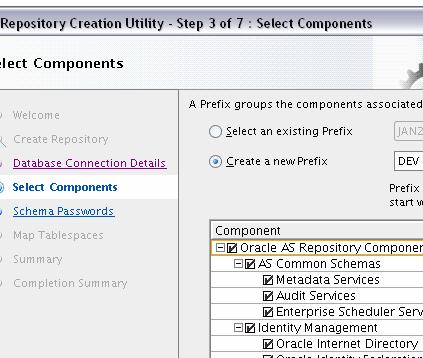
after selecting components in image1
an error occurred i.e RCU-6083:Failed- check prerequisites requirements for selected component:WEBCENTER please refer to RCU log at rcuHome\rcu\log\logdir.2012-09-14_02-43\rcu.log for details — RCU-6107:DB Init Param Prerequisite failure for: PROCESSES Current Value is 100. It should be greater than or equal to 300.
@MUHAMMAD Junaid,
Login to dataabse as sysdba and run this
SQL> alter system set processes=300 scope=both;
Restart database and then run RCU again.
Reply thanks sir but It allow meto login only as hr/hr insted of sysdba
Reply Sir when I enter this command this message will be prompted .. Specified initialization parameter cant be modified.. whats this..???
Reply Sir I’m trying to install RCU.bat..but after selecting matadata sevices and webCentre Suit [a small window appear that lists the prerequisites having 7component listed First is processed OK 2nd one is webCenter spaces that is showning X cross .. and other remaining are unprocessed ]
an error occurred i.e RCU-6083:Failed- check prerequisites requirements for selected component:WEBCENTER please refer to RCU log at rcuHome\rcu\log\logdir.2012-09-14_02-43\rcu.log for details — RCU-6107:DB Init Param Prerequisite failure for: PROCESSES Current Value is 100. It should be greater than or equal to 300.
after which I go to the SQLPLUS command line- login as SYSDBA/hr and run dis command
Login to dataabse as sysdba and run this
SQL> alter system set processes=300 scope=both;
then it prompts me: Specified initialization parameter cant be modified
So what should I do now..
Reply SQL> alter system set processes=300 scope=spfile;
then restart database
Reply Sir it wont resolved , i tried both commands and that’s the result
SQL> alter system set processes=300 scope=both;
Error: Specified initialization parameter cant be modified
or
SQL> alter system setprocesses=300 scope=spfile;
ERROR: insufficient privileges is prompted
please reply I’m stuck at that place
Reply You should use “alter system setprocesses=300 scope=spfile;”
To run this command you should login using “sys as sysdba” or a user that has sysdba privileges in database. Ask your DBA to run above SQL and he should know how to run this
Reply so please tell me whats the password of SYSDBA or SYSOPER
i’d try these
sys/hr
sysdba/hr
sys/sys
but all these wont work
It only allow me to login with hr/hr in which ALTER SYSTEM comment wont work
please tell me the commands FOR
login using “sys as sysdba” or a user that has sysdba privileges in database.
Reply @MUHAMMAD
Set ORACLE_HOME and ORACLE_SID as per your oracle database and then
cd $ORACLE_HOME/bin
./sqlplus “/as sysdba”
Then run above comnands … “alter system”
Reply thats alot problem alredy resolved .. NOw RCU is successfully installed on my machine
Reply PLEASE REPLY ME
I’ve Created DEV , UCM and PORTAL schema from RCU. and Then try to install UCM ,when schema passwrd screen appear for LOGIN and Create weblogic domain , It tell me INCORRECT PASSWORD, SO , I’ve DROP these 3 schema using RCU , during DROP schema, different errors appeared , and I’ve DELETED the middleware\rcu_Home folder and Unzip the rcu.rar fresh file to the same directory
NOW
when I RUN rcu.bat and selectec CREATE SCHEMA then RCU WOUNDNT ALLOW ME TO CREATE SCHEMAS FOR PORTAL , DEV , UCM ..and also they appear in combo box to select
BUT I’ve ALREDY DROP THAT
I think it only droped not DELETED
tell me the sqlplus commands fro DELETE schema. and also tell if it is DANGEROUS to delete some schema(example DEV schema) as I’m developing portal via WEBCENTER -Jdeveloper(integrated weblogic) , Xe , RCU, UCM )
[…] 5. OIF User/Message store and Configuration can be stored in Database . If you are planning to use Database to store User/Message data and configuration file, then create OIF schema in database using Repository Creation Utility (RCU) […]
Reply
Pretty! This has been a really wonderful post.
Many thanks for providing this information.

Hi,
While running RCU 11.1.1.6 i am facing issue as below.
ERROR rcu: oracle.sysman.assistants.rcu.backend.action.AbstractAction::handleNonIgnorableError:
Received Non-Ignorable Error: Error creating PL/SQL Object B2B_DBMS_JOB:PROCEDURE
Could any one please help me
Reply […] 1.7 You have option to create schema or use an schema (ODS) already created by RCU (Repository Creation Utility) […]
Reply
Hi,
I’m new to Discoverer and recently I install the Oracle FMW 11.1.1.6 with Oracle Forms, Reports and Discoverer successfully. I can able to access the Discoverer Plus and viewer thorugh URl successfully.
But when I create the connection though the Oracle Discoverer Plus it’s give me the error “You do not have access to any End User Layer tables”.
I didn’t create any EUL tables just created a DEV_DISCOVERER schema while running the Repository Creation Utility against 11g R2 database.
I don’t how to create the End User Layer tables and also I can find the Oracel Discoverer Adminstrator.
These are the two URl I found after the installation:
Discoverer Viewer URL: http://localhost:8888/discoverer/viewer
Discoverer Plus URL: http://localhost:8888/discoverer/plus
Do I need to seprate install the Oracel Discoverer Adminstartor 11g to create the EUL?
Thanks in Advance
Reply

Hi Atul,
I installed SOA 12c 12.1.1.0.0 version in my local machine with soa 12c rcu.
Later i installed webcenter sites, same version 12c 12.1.1.0.0 in the same machine rcu with different prefix ex:DEV1 and it successfully created schemas and created weblogic domain with existing weblogic server.
Now i want to install webcenter portal, on same machine. I came to know for portal no need to create rcu schemas, only 2 patches to be configured at jdeveloper and deployment will do it in weblogic server.
I am bit confusion with out webcenter portal rcu schemas, how it will work, simply by adding 2 patches.
If so please explain me, how webcenter installation works or is there any complete webcenter full stack installation at one place where I can get all other components.

Hi Atul,
we have ORACLE forms & report 11.1.2.2.0 on weblogic 10.3.6, ADF application 11.1.2.3.0 on FMW 11.1.1.6 with weblogic 10.3.6 and Database 11.2.0.4.0
we are using two separate link to login the applicaton. now i want to configure single sign on for both application so that user can login to both application with one use login.is this possible? if possible which version of rcu,oid etc will be used? is there any related document?please help me!

I have been reviewing online more than ten hours today for
best painters calgary & Oracle Fusion Middleware 11g
– Repository Creation Utility (RCU), yet I never found any interesting article like yours.
It is pretty worth enough for me. In my view, if all website owners and
bloggers made good content as you did, the net will be much more
useful than ever before.