



Leave a Comment:
24 comments

Hi Atul,
In case, if databsae comes down when all services are up/running,
will everything be fine, if i simply startup the database again, or should I have to restart all application services as well.
This scenario might comes in case of any hardware cluster implemented for database node which runs on virtual IP/hostname, when everything gets mounted to failover node due to database is down, and database services will be restarted by the cluster scripts.
So what happens to the application node. should we have to restart the services there manually. (N.B – Not using RAC/TAF)
-Famy
Reply
@ Famy
In case, if databsae comes down when all services are up/running, will everything be fine, if i simply startup the database again, or should I have to restart all application services as well.
Ans : Restart Application Tier services as well (OC4J use connection pool)
Reply
I n case of database it is OK sqlplus is running , but in Application tier
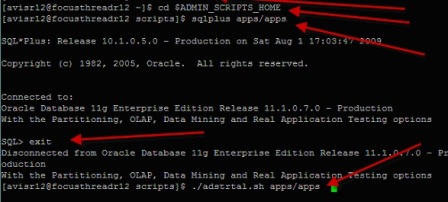
when run command sqlplus apps/apps
ERROR:
ORA-01034: ORACLE not available
ORA -27123: unable to allocate to shared memeory segment
Linux error 13 : Permission denied
plzzzzzzz help
Reply On Application Tier ensure environment variable is set properly.
Check $ORACLE_HOME and $TWO_TASK value from application tier
ORACLE_HOME should point to 806 ORACLE_HOME(in 11i) or 10.1.2 (in R12) forms and report home
TWO_TASK should point to your SID and there should be entry in tnsnames.ora in Application Tier ORACLE_HOME network directory
Reply
Hi,
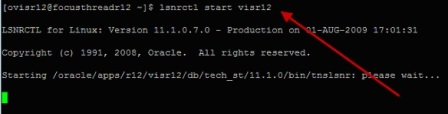
I have recently bought r12 virtual machine and trying to start database lsnr..
I get the following error.
Starting /oracle/apps/r12/visr12/db/tech_st/11.1.0/bin/tnslsnr: please wait…
TNSLSNR for Linux: Version 11.1.0.7.0 – Production
System parameter file is /oracle/apps/r12/visr12/db/tech_st/11.1.0/network/admin/visr12_focusthreadr12/listener.ora
Log messages written to /oracle/apps/r12/visr12/db/tech_st/11.1.0/log/diag/tnslsnr/focusthreadr12/visr12/alert/log.xml
Error listening on: (DESCRIPTION=(ADDRESS=(PROTOCOL=TCP)(HOST=focusthreadr12.com)(PORT=1521)))
TNS-12542: TNS:address already in use
TNS-12560: TNS:protocol adapter error
TNS-00512: Address already in use
Linux Error: 98: Address already in use
Listener failed to start. See the error message(s) above…
Reply @ Padmaja,
This means listener is already running.
check status of listener using
lsnrctl status visr12
It seems you bought it from FocusThread so if you hit issues drop me a mail on my ID and I should be able to look at it by logging on to your machine remotely over weekend.
Reply
Hi
I have installed R12.1.1 on windows XP machine successfully. Immediately after installation I was able to login to the application.
After restarting the machine I’m unable to start the DB and application services on windows XP.
Step 1) cd D:\oracle\PRODHOME\db\tech_st\11.1.0
Step 2) PRODHOME_oraclealister.cmd
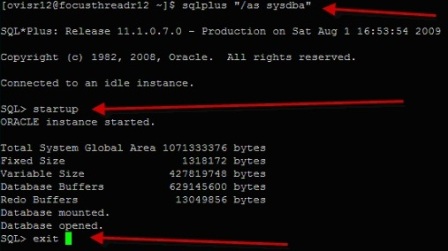
Step 3) sqlplus “/as sysdba” –> This gives the error “No TNS Listner”
Then I tried starting the lisnter using:
lsnrctl start PRODHOME –> This was successful
Now I tried Step 3) again, but it gives the error “ORA-12518: TNS:listener could not hand off client connection”
Regards,
John
Reply
Hi John,
Please start the instance service by doing.
go to start > run type ‘services.msc’
then start service OracleService$SID and try again sqlplus / as sysdba;
Thanks,
Shahid
@ John,
This could be because of Not enough memory on system
Check how much is free memory on system, check alert log and listener log of DB
Reply Hi,
I have installed R12 on windows 7 which is bought by focusthread successfully. After installation I was able to login to the application.
I am getting below error after restarting my PC. Please let me know what wrong I am doing? I have followed all steps correctly from this article.
“Internal Server Error
The server encountered an internal error or misconfiguration and was unable to complete your request.
Please contact the server administrator, ohs_admin@com and inform them of the time the error occurred, and anything you might have done that may have caused the error.
More information about this error may be available in the server error log.
Reply @ padmajabodla,
Download setup guide from http://81.143.3.107/r12vmware/
Ensure that all OC4Js are up and running
For steps on how to check OC4J status go to section under troubleshooting.
If you can’t fix this issue contact Focusthread Support team and they will fix issue remotely.
Reply
Database Tier O.S. User = oracle
Application Tier O.S. User = oracle
Database Version : 11.1.0
Database SID : VIS
hostname = oel
i have recently installed EBS R12.1.1 on OEL 5.
i have performed express installation of EBS.
After installation i was able to login to application but after restarting my pc em not able to logged in to application.
i performed following steps:
1- cd /d01/oracle/VIS/db/tech_st/11.1.0
2- ./VIS_oel.env
after performing these steps when i run lsnrctl start it results in an error
lsnrctl command not found.
please help me out how i overcome this problem.
Thank You
Saeed
@ Saeed
On point 2 run
. VIS_oel.env (dot then space and then env file)
After executing env file see if your ORACLE_HOME & ORACLE_SID are set by
a) running “env” (without quotes)
or
b) echo $ORACLE_HOME
thanks a lot Atul Kumar
now its working.
can u plz tell me how to explore HR in EBS.
thanks again 🙂
Saeed
Reply Hi,
How can I clear AME cache? We are in the UAT phase and go live is on Monday.
Whenever I compile AME custom package (which is a copy of AME_UTIL), AME displace invalid object error in ame_exceptions_log. It worked some times when we ran the utlrp.sql script with SYSDBA privilege. Can you please help me to find out the where to clear cached object.
Thanks in advance,
Padmaja

Atul,
I have bought the virtual machine from Focusthread some time back but never used it actively as old PC was not powerful enough. Now I have bought a new laptop and put all the files on C drive. I have followed all the steps but getting error TNS-12560: TNS:protocol adapter error.
[ovisr12@focusthreadr12 ~]$ lsnrctl start visr12
LSNRCTL for Linux: Version 11.1.0.7.0 – Production on 19-SEP-2011 14:21:18
Copyright (c) 1991, 2008, Oracle. All rights reserved.
Starting /oracle/apps/r12/visr12/db/tech_st/11.1.0/bin/tnslsnr: please wait…
TNSLSNR for Linux: Version 11.1.0.7.0 – Production
System parameter file is /oracle/apps/r12/visr12/db/tech_st/11.1.0/network/admin /visr12_focusthreadr12/listener.ora
Log messages written to /oracle/apps/r12/visr12/db/tech_st/11.1.0/log/diag/tnsls nr/focusthreadr12/visr12/alert/log.xml
Listening on: (DESCRIPTION=(ADDRESS=(PROTOCOL=tcp)(HOST=focusthreadr12.com)(PORT=1521)))
Connecting to (DESCRIPTION=(ADDRESS=(PROTOCOL=TCP)(HOST=focusthreadr12.com)(PORT =1521)))
TNS-12571: TNS:packet writer failure
TNS-12560: TNS:protocol adapter error
TNS-00505: Operation timed out
Linux Error: 110: Connection timed out
In one of the reply you mentioned that listner must already be running but looks like its not. Here is the output of the status command. Your help is really appreciated.
[ovisr12@focusthreadr12 ~]$ lsnrctl status visr12
LSNRCTL for Linux: Version 11.1.0.7.0 – Production on 19-SEP-2011 14:56:54
Copyright (c) 1991, 2008, Oracle. All rights reserved.
Connecting to (DESCRIPTION=(ADDRESS=(PROTOCOL=TCP)(HOST=focusthreadr12.com)(PORT=1521)))
TNS-12535: TNS:operation timed out
TNS-12560: TNS:protocol adapter error
TNS-00505: Operation timed out
Linux Error: 110: Connection timed out
[ovisr12@focusthreadr12 ~]$
Please help me out here. I had sent email to your support team but never got any response.
Reply @ Hitesh,
Contact them on their support address and they will sort this out for you.

On R12, Clear middle tier cache is
Navigate to Functional Administrator responsibility > Core Services >
Caching Framework > Global Configuration > Clear cache
Is clearing $COMMON_TOP/_pages file not certified method for R12?
Thanks
Dilip
Reply
@ Musab,
Use widnows service or same command but with .bat extension

Dear Kumar,
While stopping services of APPS through adstpall.sh
At the end of script, I am receiving error “Exiting with Status 1”.
When I reviewed the log file, I have come to know that adoacorectl.sh Failed.
Can you help me in this regard to diagnose the problem.
Thanks and Regards,
Junaid
Reply
Dear apps dba,
For security reasons,
Can we start/stop the oracle apps services using non ‘apps’ user ?
Because, if we write the password in the .sh file, we worry it’ll be read by others, so we want to create another user in the database.
Please help, thanks for your info.
Rgd,
Penta

your website is great to view it sir thank you for your valluable information regards
Reply