
Oracle Identity Manager (OIM) is identity provisioning and reconciliation application and part of Oracle Identity Management Suite.
Oracle Identity Analytics (OIA) is role management that automates identity based controls and is also part of Oracle Identity Management Suite.
OIA can be integrated with OIM so that OIA becomes source of role management and users in OIA’s identity warehouse can be provisioned from OIM. OIM-OIA integration is very well explained in OIA’s System Integration guide
One of the step in this integration guide that in my view is not clearly explained (or could have been explained in better way) is Modify OIM Forms using Form Designer.
I am going to explain changes required in OIM process forms.
- First identify all Resources integrated with OIM like Active Directory (AD) or Sun Directory Server
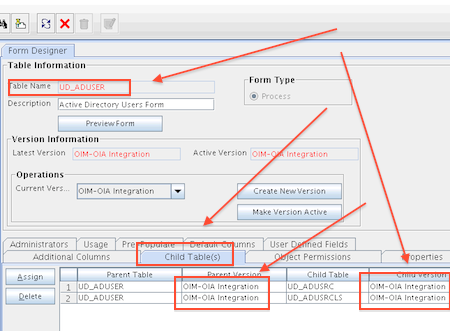
- For each resource (Active Directory or Sun Directory Server) identify parent process form . For Example for Active Directory resource parent process form is UD_ADUSER (Active Directory User Form)
- Identify Child Process Form (for Parent Process Form) For Example for Active Directory User Form (UD_ADUSER) child forms are UD_ADUSRC (Assigned Groups Form) and UD_ADUSRCLS (Assigned Object Class Form)
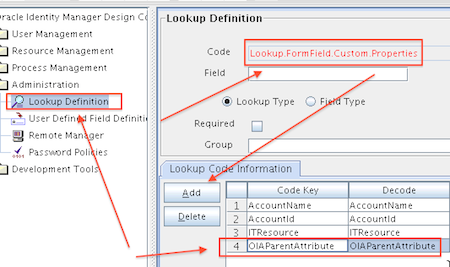
- If OIM version is 11.1.1.5+ then add property Code Key=OIAParentAttribute, Decode=OIAParentAttribute in lookup Lookup.FormFieldCustom.Properties
- You would need access to OIM Design Console, More on Design Console in OIM 11g here and Design Console version 9/10 here
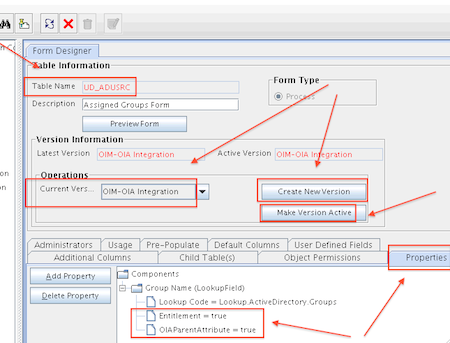
- For child process form (Assigned Groups Form UD_ADUSRC for Active Directory user form), create new version and add two property Entitlement=true and OIAParentAttribute=true (ensure to make new version of child process form ACTIVE)
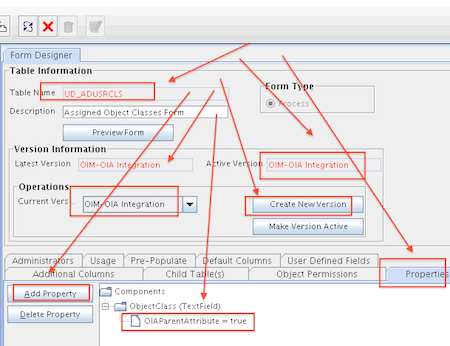
- For child process form (Assigned Object Classes Form UD_ADUSRCLS for Active Directory user form), create new version and add property OIAParentAttribute=true (ensure to make new version of child process form ACTIVE)
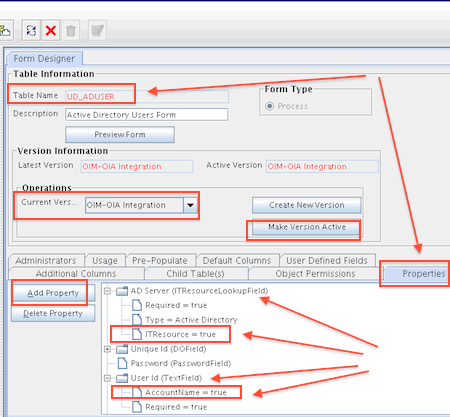
- For parent process form (Active Directory Users Form UD_ADUSER for Active Directory Resource), create new version and add property ITResource=true for AD Server (ITResourceLookupField) and AccountName=true for User ID (TextField) (ensure to make new version of parent process form ACTIVE)
- Verify that Parent & Child Process Forms are latest updated version and are ACTIVE
More on OIA-OIM integration tasks in future posts
Related Posts for OIA
- #Oracle Identity Analytics ( #OIA ) : earlier Sun Role Manager : Documentation
- Install Oracle Identity Analytics (OIA) 11gR1 PS1 (11.1.1.5)
- OIA (Identity Analytics) deployment failed on WebLogic Server Error 1 : java.lang.NoClass DefFoundError: org/apache/ log4j/Category
- Oracle Identity Analytics (OIA) Architecture
- OIA (Identity Analytics) RBACX – Startup on WebLogic Server Error 2 : java.lang. NoClassDef FoundError javax/xml/ namespace/QName
- OIA Startup Error : Failed to import bean definition security-acls-context.xml
- How to find Oracle Identity Analytics (OIA – RBACX) version
- Oracle Identity Analytics (OIA) : Global Users vs OIA Users : 1Z0-545 Security Models in OIA
- OIM-OIA Integration : Update Process Form (Parent & Child) in OIM : OIAParentAttribute, AccountName, Entitlement, ITResource
- OIA – Resource (or Endpoints) and Resource Types (or namespaces)
- Policies in OIA and association with Role, Resource Type, Resource
- Business Structure (Business Unit) in OIA : Basics you must know
- Accounts, Account Type, and Orphan Accounts in OIA
- OIM to OIA sync : Import Users Job failed : OIA_STAGING_ACCOUNTS & OIM_PKG_OIA_INTEGRATION


Good hands-on exercises (installation, patching, cloning), very experienced trainer worth every penny 
3 users commented in " OIM-OIA Integration : Update Process Form (Parent & Child) in OIM : OIAParentAttribute, AccountName, Entitlement, ITResource "
Follow-up comment rss or Leave a TrackbackHi Atul,
Thanks for this url. This tutorial looks detail explanation although I am so beginner in Oracle Apps arena to understand this advance tutorial.
Hope within couple of months, I would be.
Thanks once again.
Gautam
[...] If you have configured OIM to OIA integration (More here) and after running Job “Import Users, Accounts, User Role Memberships, and [...]
[...] 11gR1 is integrated to OIM using steps mentioned here and here [...]
Leave A Reply