This post is next in series “Learn WebLogic with Us“, Till now we learned
- Install Oracle WebLogic Server
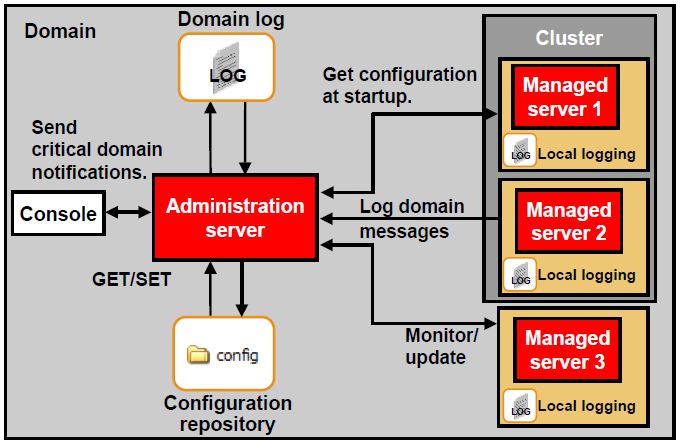
- Definition of Domain, Administration & Managed Server in Oracle WebLogic
- Create DOMAIN with one Administration Server or two managed server in Cluster
and finally - How to start Administration or Managed Server in WebLogic
This post covers steps to deploy application (ear, war, jar) on Oracle WebLogic Server
.
Things good to know before deploying application on Oracle WLS
i) User with Admin or Deployer role can deploy application
ii) Weblogic supports following type of deployment unit
a) EAR file (Enterprise Archive)
b) WAR file (Web Archive)
c) JAR files, EJB (Enterprise Java Beans)
d) RAR (Resource Adapter/Connector )
e) Web Services (WAR/JAR)
f) J2EE Library
g) CAR (Client Application Archive)
– Web Archive configuration file is usually …../WEB-INF/web.xml
– Enterprise Application (EAR) configuration file is usually …/META-INF/application.xml
iii) Application name can contain only following character (a-z, A-Z, 0-9, underscore, hyphen, . period/dot)
iv) Application name with only period/dot (like . or .. or …) is not valid name, it should contain at least one other character.
v) Application Name should be 215 character or less
.
Tools used to deploy/configure applications
1) weblogic.Deployer - command line interface
2) Administration Console - Web based interface
3) WLST(WebLogic Scripting Tool) - command line tool to automate deployment configuration and operation
4) Tool for developers (wldeploy, weblogic.PlanGenerator, API, autodeploy)
.
Steps to Deploy Application using Administration Console
In this post I’ll cover steps to deploy application using Administration Console
Download Sample Application from here use this file to deploy on WebLogic Server.
1. Start Administration Console if its not Up already (In my case Administration Server is listening on port 7001)
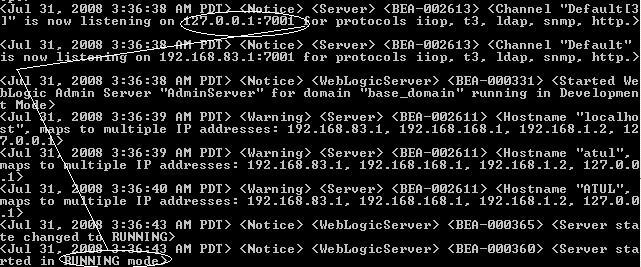
2) Access Administration console using URL http(s):// <hostName>:<port>/console
3) Login using User (with admin or deployer role) weblogic in my case
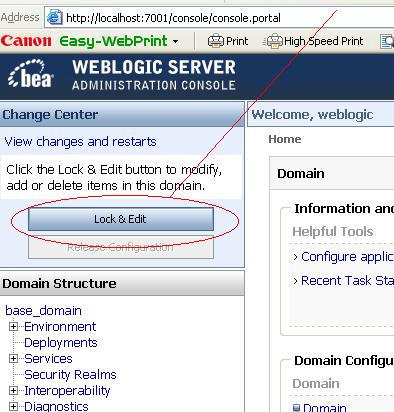
4) First step is to acquire Lock as shown in screen
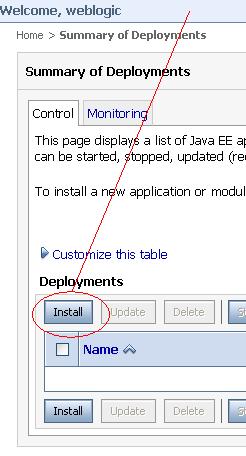
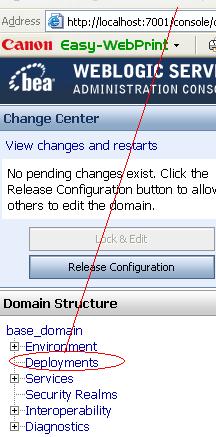
5) Click on deployment
7) Select Application (war, jar, ear) File . You should get this application (war, ear, jar) file from development team.
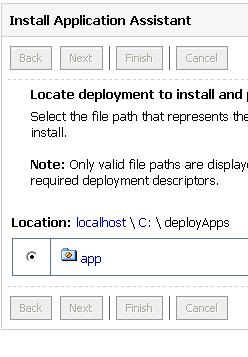
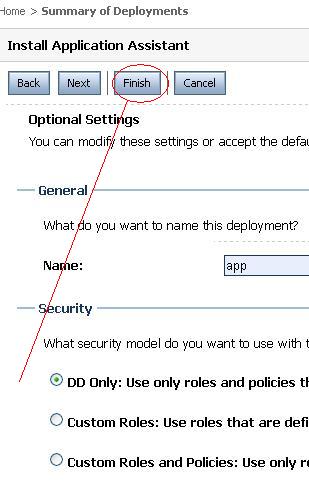
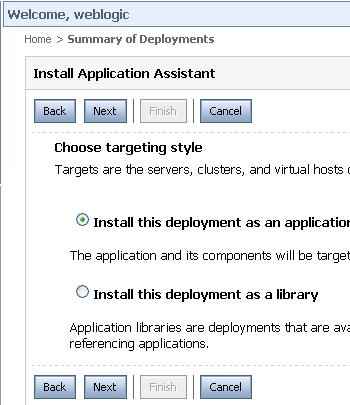
Select Install this deployment as Application and click Next
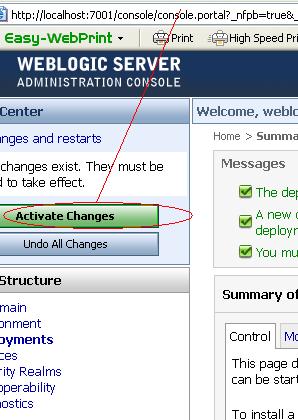
9) Activate Canges by clicking on button on left as shown in screen
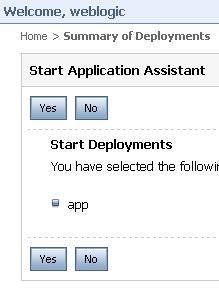
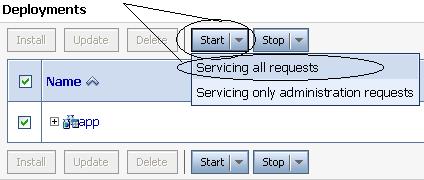
10) Start Application by clicking on Start Button
.
.
Access Video on How to deploy application on WebLogic from here
Related Posts for Learn WebLogic with Us
- Oracle WebLogic Installation Steps
- Domain , Administration & Managed Server, Cluster in Oracle WebLogic
- Create Domain in Oracle WebLogic
- Oracle WebLogic Server - Startup/Shutdown
- Oracle WebLogic Server 10g R3 10.3 is out now
- Deploy Application on Oracle WebLogic Server
- Cluster Architecture : Oracle WebLogic Server
- Start WebLogic Server on Linux on port 80, 443 <= 1024
- JDBC (Java DataBase Connectivity ) in Oracle WebLogic - Overview
- WebLogic Server JDBC for Database connection : Step by Step
- Security in Oracle WebLogic : Realm, Security Provider, Authentication, Authorization, Users
- Deploy ADF application to Oracle WebLogic Server
- Node Manager in Oracle WebLogic Server
- Configure Oracle HTTP Server infront of Oracle WebLogic Server mod_wl_ohs
- How to install weblogic server on 64 bit O.S. (Linux /Solaris) ?
- Oracle WebLogic Login Issue : Password is not correct (Password Lock Policy)
- Oracle WebLogic Server : Node Manager in nutshell
- Certification : 1Z0-108 Oracle WebLogic Server 10g System Administrator Certified Expert
- How to integrate WebLogic with Oracle Internet Directory for Login : Authentication
- opatch, adpatch and now “smart update” (BSU) to apply weblogic patches
- Disater Recovery documentation for Oracle WebLogic Server 11g (Fusion Middleware)
- Authentication Providers in #WebLogic - Oracle Access Manager Identity Assertion for Single Sign-On and OAM Authenticator
- Error while starting WebLogic Server : java.lang.NumberFormatException: null
- #WebLogic startup prompting from username password : boot.properties
Popularity: 16% [?]


Good hands-on exercises (installation, patching, cloning), very experienced trainer worth every penny
13 users commented in " Deploy Application on Oracle WebLogic Server "
Follow-up comment rss or Leave a Trackback[…] Oracle releases BEA Workshop as a free eclipse plugin First saved by meganashley | 1 days ago Deploy Application on Oracle WebLogic Server First saved by sporty04 | 1 days […]
am newbie and all the stuff what u hav posted here are really very helpfull.
thanks a bunch for your posts.
please keep posting for us.
regards
gani
thank you for this website. tremendous information!
I followed all steps here,
When I click ‘Start’ button to start ‘Servicing all requests’ of jspExpressionEar, got this error. wouldn’t start. any idea?
Message icon - Error java.lang.Exception: [DeploymentService:290049]Deploy failed for id ‘1,225,844,443,766′ since no targets are reachable.
Thanks in advance.
Kim,
Found an answer for this.
I didn’t add a Admin server as a target in a cluster case.
After deployed jspExpressionEar application.
When I clicked this url http://localhost.localdomain:7001/jspExpressionEar, got this error.
“Error 404–Not Found”
10.4.5 404 Not Found
Any idea?
404 means there is no such page to serve from web server .
Was there any error while deploying this application (ear) ?
No, didn’t get any errors during deployment.
Where do the web things go? maybe under domain?
thank you for quick reply.
Good work. Keep going and thank you.
Can you also please post instructions to deploy application via scripts - shell or perl or Weblogic scripting lang
TIA
Hi,
Thanks for posting the new concept weblogic server 10.3.
I have some doubt regarding deployment in wls-10.3
Multiple applications can be deployed at a time on wls-10.3–How it is possible
please clarify……
Thanks in advance
Rajeswari kanchamireddy
Hi
Nice article to get started
please provide step by step deployment of entity beans in oracle weblogic 10.3, using eclipse, and how to configure jms.
Hello,
I’m using weblogic 10.3.
I have problem when i run a web application.
The problem is accured when weblogic try to compile jsp page that contains such syntax :
<jsp:param name=”messageKey” value=”" />
When i change this assertion to :
<jsp:param name=”messageKey” value=”" />
It works fine..
This problem is general with all syntax like this : value=”<%=%>
It’s a big problem, becaus the application contains more than 2000 jsp pages..
Are there any special config to add to weblogic configuration files to resolve this problem ?
Thanks
Hi,
I am using weblogic 10.0 The problem is I am getting ” java.lang.Exception: [DeploymentService:290049]Deploy failed for id ‘1,260,961,264,281′ since no targets are reachable” eventhough ManagedServer is running please help..
Prashanth
Leave A Reply